
A user asked for clarification on how to properly format custom settings for capturing VDI data for employees view in Edge DX. Another user provided a solution and mentioned updating the documentation to avoid future errors. A screenshot of the updated JSON was also shared.
Read the entire ‘Clarifying Formatting for Capturing VDI Data in ControlUp Edge DX’ thread below:
https://support.controlup.com/docs/capturing-vdi-data-for-employees
Does anyone have a screenshot of how the custom settings should be formatted for capturing VDI data for employees view in Edge DX?
When I copy and paste the data from the guide directly and click "check and beautify" I receive a message that it isn’t formatted as json.
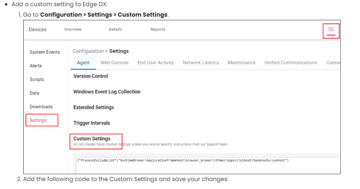
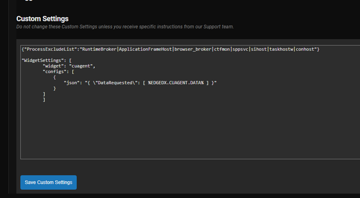

The text inside of the custom settings widget needs to be valid JSON. Try this. You will need to double check the process exclusion list. As mine might be old and/or doesn’t contain anything you might have added.
“`{
"ProcessExcludeList": "RuntimeBroker|ApplicationFrameHost|browser_broker|ctfmon|sppsvc|sihost|taskhostw|conhost",
"WidgetSettings": [
{"widget": "cuagent",
"configs": [
{
"json": "{ \"DataRequested\": [ %EDGEDX.CUAGENT.DATA% ] }"
}
]}
]
}“`
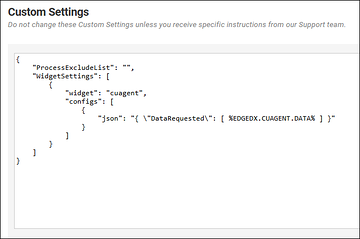
Hey @member sorry about the error in the docs. I will review the provided JSON and update it if needed
Ah I see. The existing brackets need to go around everything. Worked perfectly after using your code @member. Thank you!
Continue reading and comment on the thread ‘Clarifying Formatting for Capturing VDI Data in ControlUp Edge DX’. Not a member? Join Here!
Categories: All Archives, ControlUp for Desktops