
A member reported an issue where the data points on the CPU graph do not show any service processes. This is happening on all of Eugene’s devices running Windows and macOS. ControlUp’s support will check the issue and reach out to Eugene with a support ticket.
Read the entire ‘CPU Data Points Not Showing Any Service Processes’ thread below:
Good day
Can anyone else please check for me , Since Monday ,we no longer can see what process the CPU was using , usually if you hover over once of the time points it would show MSTEAMS.exe or Googlechrome.exe stuff like that , now it doesn’t show it at all
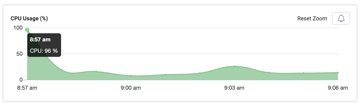
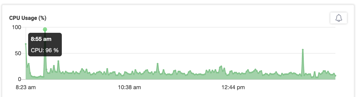
Checking
None of the data points show anything?
Only shows the times and the CPU % as per the images
Aiming in my team said that she saw a service / process but if she moves to a next time point is gone again
Hello Eugene, Can you tell me if this is occuring on all of your devices or only on a single system?
I was busy with 4 devices today and saw it on all 4
3 windows
1 macOS
Thank you, Eugene. As this appears to be affecting all your devices, I will create a support ticket for you and we will reach out to you directly.
Thank you
Continue reading and comment on the thread ‘CPU Data Points Not Showing Any Service Processes in ControlUp’. Not a member? Join Here!
Categories: All Archives, ControlUp for Desktops