
A user asked how to change the COP server on which the ControlUp Real-Time Console was connected. Wouter suggested finding a registry key which did the trick. The full documentation can be found at https://support.controlup.com/docs/controlup-on-premises-real-time-console-installation.
Read the entire ‘Changing COP Server for ControlUp Real-Time Console’ thread below:
Hello,
Does anyone know how I can change the COP server on which my RT console connects please ? Except after the 1st start, I cannot select another COP server.
Must I uninstall and then reinstall the RT Console ? Is there an option in the command line to start RT console to define the server ?
I was on a standalone COP server and I would like now to connect to both my COP server and my failover server just as described in the documentation (https://support.controlup.com/docs/controlup-on-premises-real-time-console-installation)
Thank you.
COP Server and RT Console v.8.7.0.24
don’t know the location from the top of my head but it’s in a reg key somewhere
this should be it
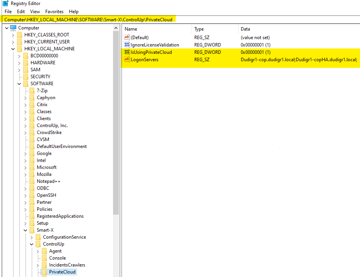
Thank you Wouter. So I’m gonna check it.
Great, I added my failover COP server. Thank you Wouter.
Continue reading and comment on the thread ‘Changing COP Server for ControlUp Real-Time Console’. Not a member? Join Here!
Categories: All Archives