• Skip to primary navigation
  • Skip to main content
  • Skip to primary sidebar
  • Skip to footer
ControlUp Community

ControlUp Community

Connect, Learn, and Grow

  • Blog
  • Archives
  • Findings
  • Meetups
  • Videos
  • Events
  • Categories
    • ControlUp One Platform
    • ControlUp for Apps
    • ControlUp for Compliance
    • ControlUp Dashboards
    • ControlUp for Desktops
    • ControlUp for VDI
    • ControlUp Scripts & Triggers
    • ControlUp Synthetic Monitoring
    • ControlUp Workflows
  • Topics
    • Logos & Wallpaper
    • ControlUp.com
  • Join

Microsoft Cloud PC

Automating Windows 365 Cloud PC Rightsizing with AI Canvas: Cost and Performance Optimization

Posted on November 3, 2026

A new AI prompt has been developed for ControlUp's AI Canvas to automate the rightsizing evaluation of Windows 365 Cloud PCs within an organization. The prompt identifies every Windows 365 Cloud PC, determines its current plan based on CPU, RAM, and storage configuration, and analyzes recent performance metrics to assess whether the plan suits the workload. It estimates the potential savings or costs associated with resizing each Cloud PC and presents the results along with actionable recommendations. The process begins by querying all Cloud PCs configured with the Microsoft Cloud PC provider. Devices not reporting back within the last 14 days are excluded from sizing recommendations but flagged separately since they may still incur licensing costs despite inactivity. The prompt calculates usage metrics over a recent 7-day window, focusing on CPU load (p95) and memory utilization (p95), plus storage consumption on the system disk. Oversizing is flagged when CPU and memory usage consistently remain low (under specified thresholds), prompting recommendations to downgrade one step in the plan ladder if the workload still fits comfortably within the smaller configuration. Conversely, oversizing occurs if resource usage exceeds defined upper limits, triggering an upgrade suggestion. Storage sizing is handled separately, moving devices to plans with appropriately sized storage tiers based on usage, with thresholds designed to avoid undersized or oversized drives. Pricing uses Microsoft’s public Windows 365 Enterprise list prices as of November 2026, converted into cost differences reflecting the proposed resizing changes. The prompt outputs a comprehensive dashboard including a net monthly savings stat, a donut chart categorizing Cloud PCs by sizing verdict (right-sized, oversized, undersized, storage too small/large, not reporting, or unmatched), and a detailed table for all devices showing current and recommended plans, verdicts, pricing impact, VM size, region, and storage type. An AI-generated summary provides holistic findings, including potential savings, constraints on high-demand users, and caveats such as volume licensing discounts and workload peaks outside the measurement window. Testing in lab environments indicates the prompt works reliably, producing clear and actionable results within acceptable execution times. Feedback suggested that the visual emphasis on total savings paired with detailed explanations improved usability. The solution currently covers Enterprise licenses only, with Business and Frontline licenses excluded from analysis, and the pricing reflects list prices that may differ from negotiated agreements. This prompt is intended to run as a single AI Canvas operation with efficient batch querying to stay within API limits, making it scalable for real-world tenant environments. This AI prompt for Windows 365 rightsizing represents a powerful tool to optimize Cloud PC deployment costs and performance by providing IT teams with data-driven resizing recommendations and potential financial impact upfront. Further refinements may include extending support for additional license types and adjusting resource thresholds as usage patterns evolve. For more information about Windows 365 Cloud PCs and rightsizing, see the official Microsoft documentation: https://docs.microsoft.com/en-us/windows-365/right-sizing-cloud-pc and ControlUp resources at https://docs.controlup.com. Read the entire article here...

When AI Helps, When It Doesn’t: Notes From a Fireside Chat on IT’s Next Chapter

Posted on April 20, 2026

In our latest ControlUp Community Meetup, Co-Founder Yoni Avital, ControlUp expert Eugene Kalayev, and Shane Kleinert from Choice Solutions sat down for a fireside chat on where EUC is headed. The panel tackled the big question: where does AI actually fit in EUC operations? Read the entire article here...

Partial Visibility for Windows 365 Cloud PC Via BYOD

Posted on February 19, 2026

A team member needed partial visibility from a BYOD connecting to a Windows 365 Cloud PC. The Cloud PC had Device Agent installed, but not the BYOD. The solution was to install the Remote Client plug-in on the BYOD Windows PC. More information can be found at https://support.controlup.com/docs/windows-365-edge-dx. Read the entire article here...

Troubleshooting W365 CPC Integration and Visibility Issues

Posted on March 14, 2025

A group of ControlUp members discuss issues with the integration between W365 CPC and HDX. They note that EdgeDX does not detect brokering of a Cloud PC session, but the current configuration does show access to TURN and use of UDP. The group mentions that this may be due to the VDA configured on the device. There is also mention of potential confusion around which agent to use for the CPC Desktop, and a suggestion to pull a query to track the number of CPCs with a VDA installed and see what is reported. It is noted that there is interest from established enterprises to go this route. Read the entire article here...

ControlUp Community Radio Episode #17 – In Conversation with Cláudio Rodrigues, Imagineer

Posted on October 29, 2024

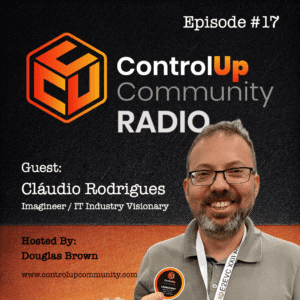
Tune in for Episode #17 of ControlUp Community Radio, where host Douglas Brown engages with Cláudio Rodrigues, an EUC pioneer with over 25 years of experience. Read the entire article here...

ControlUp Community Meetup #9 – Tech Expert Panel Q&A – Ask Us Anything – Recording Available Now!

Posted on September 10, 2024

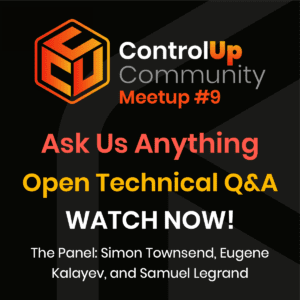
We are happy to announce that our recent ControlUp Community Technical Meetup recording is now available! The session featured a fantastic panel of experts, Simon Townsend, Eugene Kalayev, and Samuel Legrand, who answered many great questions from our audience. Read the entire article here...

ControlUp Community Radio Episode #1 with Jed Ayres, CEO at ControlUp

Posted on November 15, 2023

In the first episode, we're delighted to welcome Jed Ayres, CEO of ControlUp, who will discuss his vision for ControlUp's future. He'll also delve into topics like EUC and DEX, and explore key strategies for ControlUp's growth. Read the entire article here...

Latest ControlUp Blogs on Microsoft CloudPC, Intune, and Windows 365, Don’t Miss!

Posted on August 14, 2023

ControlUp is known for having a great technical blog with articles written by very intelligent industry experts with decades of experience. Keep your eye on it; you can truly walk away with good information and be much more knowledgeable on what's trending and essential in IT today. Read the entire article here...

Primary Sidebar

ControlUp Academy

Enroll in ControlUp Academy for expert-led technical training, equipping you with skills to effectively deploy, manage, and grow your ControlUp investment.

Learn here >

Rotating Images

Hidden Gem from our Community on Slack!

ControlUp Betas - What's Coming Next?
NEW ControlUp Features - Stay Up-to-Date!
ControlUp Scripts - Scripting, Zero to Hero
Latest KB Articles - Be the First to Learn

Video Tutorials Library

Visit our technical how-to videos, offering step-by-step tutorials on advanced features, troubleshooting, and best practices.

Watch here >

ControlUp Blog

Check out the ControlUp blog for expert advice and in-depth analysis.

Read here >

ControlUp Script Library

Visit the ControlUp technical script library, which offers a multitude of pre-built scripts and custom actions for your monitoring and troubleshooting requirements.

See here >

ControlUp Support

Visit the ControlUp support home and to delve deeper into ControlUp DEX solutions.

Browse here >

Footer


ControlUp Community
Of Techie, By Techie, For Techie!

Terms of Use | Privacy Policy | Security
Dive Deeper, Learn more at ControlUp.com

  • facebook
  • twitter
  • youtube
  • linkedin

© 2023–2026 ControlUp Technologies LTD, All Rights Reserved.

We use cookies to ensure that we give you the best experience on our website. by continuing to use this site you agree to our Cookie policy..