
A discussion took place about upgrading controlUp agent and left-over files. It was discovered that cuAgent can also be installed/upgraded via winget, and an error message was encountered when trying to upgrade to version 9.2.0.622. Further questions were raised about why there may be left-over files after upgrading and if winget can detect installs pushed via console.
Read the entire ‘ControlUp Agent Upgrade Troubleshooting and Left-over Files’ thread below:
cuAgent vs winget vs left-over files…
I just figured out that cuAgent will also be installed/upgrade via winget.
I have a machine which got cuAgent 9.2.0.432 (beta) installed via Realtime console. Then I ran "winget upgrade –all" and figured out cuAgent was updated to 9.2.600.
Ok… Luckily Realtime console and monitors are already 9.2.0.600 so all good.
Now I see winget is offering 9.2.0.622…
First Question:
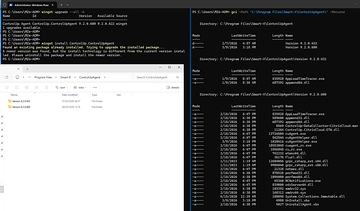
Why is the upgrade to 9.2.0.622 failing with "A newer version was found, but the install technology is different from the current version installed. Please uninstall the package and install the newer version." (see screenshot)?
Because upgrading to 9.2.0.600 via winget was working a treat.
Second Question:
Seems that the upgrade leaves some files behind. Saw this also when upgrading cuAgent via Realtime console.
Sometimes cuAgentHelper.dll is still in "old-version"-folder while cuAgentHelper.exe is in the "new-version"-folder of cuAgent…
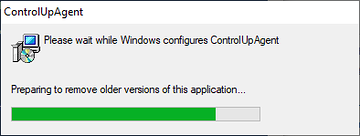
I can’t reproduce this. In fact, the installer even shows that it is uninstalling the previous version.
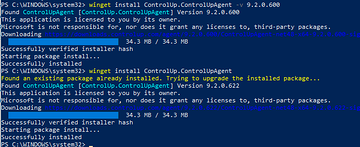
I wonder if winget also detects console pushed agent installs?
Well. In above case 9.2.0.432 was pushed via console and winget updated to 9.2.0.600 but now fails to update to 9.2.0.622…
Interesting. Because the YAML for .600 hasn’t changed. The installed type has always been MSI, scope machine, etc. All the same as .622
Continue reading and comment on the thread ‘ControlUp Agent Upgrade Troubleshooting and Left-over Files’. Not a member? Join Here!
Categories: All Archives, ControlUp for VDI