
A user asked for clarification on scoping permissions in ControlUp. They wanted to know if it was possible to target only groups and not tags, and if all groups and tags were targeted by default. Another user confirmed that it is possible to deselect all options in the tags dropdown to target only groups, and that the "Groups OR tags" logic applies when both groups and tags are selected. The documentation will be updated to make this clearer. The relevant information can be found at https://support.controlup.com/docs/dex-platform-account-permissions#limit-permission-scope-to-certain-devices
Read the entire ‘Clarifying Scoping Permissions in ControlUp’ thread below:
When scoping permissions it is required to are a scoped tag and group? The reference from Controlup reads group OR tag but then in the next line says you need both. I would assume that is because all groups are targeted by default? Would they be a way to target scoping ONLY for groups? Looking for guidance here. We have multiple teams entering our environment and would be curious to hear others best practices. below is the paragraph where controlup references.
Limit permission scope to certain devices
You can set the scope for a permission so that it applies only to certain devices. For example, you can give a help desk employee permission to remote control devices in the HR department, but not allow them to remote control devices used by senior executives.
You can set the scope of a permission by targeting devices with groups and tags. The permission applies to a device only if the device is in one of the specified groups OR has at least one of the specified tags. By default, all groups and all tags are targeted. This means that you must edit both the groups and tags targets to limit a permission to certain devices. Learn more about device groups and tags.
Note that you can set the permission scope only for certain permission categories.
Hey @member Yes you can target ONLY by groups by deselecting all the options in the tags dropdown (see screenshot). You are also correct that the docs say you have to edit both because all groups and all tags are targeted by default, and just targeting a group would be sort of meaningless if all tags are also targeted.
I understand why you were confused by that, and I’m going to update the docs section now to make this more clear!
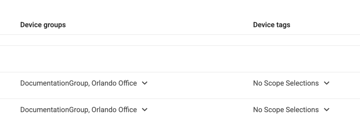
The "Groups OR tags" explains the logic when both tags and groups are selected from the dropdowns.
Continue reading and comment on the thread ‘Clarifying Scoping Permissions in ControlUp’. Not a member? Join Here!
Categories: All Archives, ControlUp for Desktops