
A user encountered an error while trying to install a new version of ControlUp. They were unable to manage Hyper-V servers and were advised to remove the machines from the old ControlUp organization. The necessary steps were provided along with a link for more information.
Read the entire ‘Troubleshooting ControlUp Installation Issues for Hyper-V Servers’ thread below:
Installing New version of Control up and cannot pull already managed hyper v servers and get this message
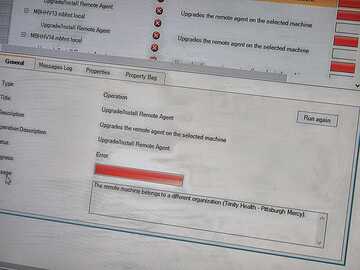
Looks like you need to first remove the Hyper-V machine from the old CU org
something like
Stop-Service cuAgent
Remove-Item -Path "HKLM:\SOFTWARE\Smart-X\ControlUpAgent" -Recurse
If 64-bit Windows, also run:
Remove-Item -Path "HKLM:\SOFTWARE\Wow6432Node\Smart-X\ControlUpAgent" -Recurse
A little more info here as well https://support.controlup.com/docs/computer-already-belongs-to-another-controlup-organization
Continue reading and comment on the thread ‘Troubleshooting ControlUp Installation Issues for Hyper-V Servers’. Not a member? Join Here!
Categories: All Archives