
ControlUp Academy – a training platform with free self-training and instructor-led content, where certifications from ControlUp can be obtained. There are no recent changes to Dashboards, and an index issue is discussed. Steps to fix the issue are provided. The PowerShell script was updated. The index is split into multiple indexes over time and it displays the first payload’s column type.
Read the entire ‘Troubleshooting Index Issue in ControlUp Academy’ thread below:
Was there a change to Dashboards over the weekend?
I have a custom index. It has a column for GPO download time. There used to be a Aggregation of Highest Value for Stat. Now, the drop down is just Unique Count and Count.
@member @member FYI
There was no deployment of Dashboards this weekend. Can you tell me what the column type shows in the index viewer within CU4D?
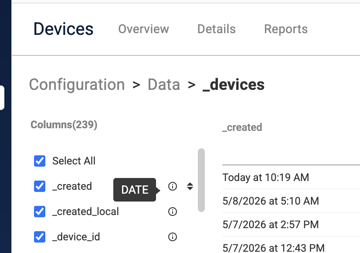
Custom index and the column has numbers. Last week, my dashboard was working. No change to our script that captures the data
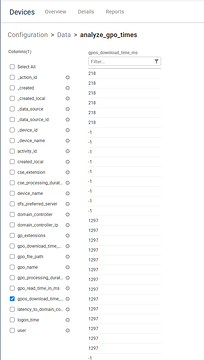
What was the specific type when you hover over the (i)?
Just two options now

Hi Arthur, please hover on the ⓘ symbol next to the field in the data index
TEXT
It should be LONG I assume.
That is the issue – for some reason, the index is saying the numeric field is TEXT. And you’re correct, it should be LONG
Oddly enough, when I first jump into the dashboard, highest value is listed, but it’s blank.
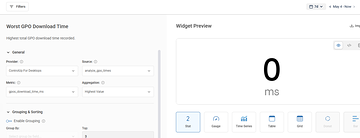
So, last week it worked.
If I reselect the same metric, just count and unique count
I’ll review our PowerShell script (which actually was provided by Trentent), to see why it is writing as TEXT now.
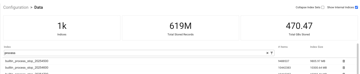
So for context, a data index is split up into several indexes over time. You can see this in the UI under Data and uncheck "Collapse Index Sets".
So for each week, it generates a new index.
When it does this, the first payload that lands in this index will define the column type.
So if for some reason, the first payload was "" or non-numeric, it could have typed this as TEXT.
A workaround could be in your script to normalize empty values and ensure you only send numeric columns.
The reason it worked last week is that the index was properly typed. You can confirm by unchecking that box and going to last weeks index
@member FYI
checking now…..
I went to my oldest one, top one, says TEXT still.
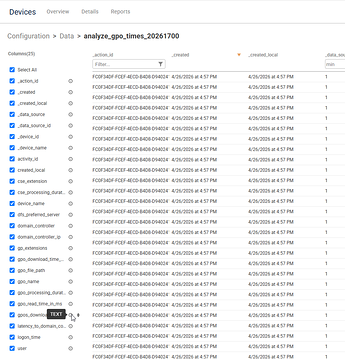
I literally was looking at the dashboard last week.
Now I cannot explain that… 🙂 Maybe its good to have the CU4D folks take a look. Maybe we should get a support ticket going?
Either way – we need to normalize the numeric values from the script to ensure it never gets typed as TEXT
I’m reviewing the PowerShell script now. Another datapoint, gpo_download_tims_ms is LONG
Gemini did the analysis
You spotted a classic PowerShell data-type quirk! Yes, there is a distinct difference in how the script retrieves and formats those two specific values, which explains why ControlUp is interpreting their data types differently.
Here is exactly what is happening under the hood:
- gpo_download_time_ms is calculated math (Numeric)
For the individual GPO download time, the script calculates the duration using a math formula by subtracting the start event time from the end event time:
PowerShell
$downloadTime = ($endEvent.TimeCreated – $startEvent.TimeCreated).TotalMilliseconds
In PowerShell, the
.TotalMilliseconds property automatically outputs a Double (a floating-point number). When ConvertTo-Json runs at the end of the script, it sees a native number and outputs it without quotes (e.g., 45.1234). ControlUp ingests this native number and correctly identifies it as a LONG or numerical value.
- gpos_download_time_ms is extracted from XML (String)
For the total GPOs download time, the script doesn’t do any math. Instead, it pulls the pre-calculated value directly out of the Event Viewer XML data:
PowerShell
$downloadGPOTiming = ($([xml]$downloadGPOTimeEvent.toxml()).Event.EventData.Data | Where-Object { $_.Name -eq ‘PolicyDownloadTimeElapsedInMilliseconds’ }).’#text’
Because it is pulling the
.’#text’ value of an XML node, PowerShell natively treats $downloadGPOTiming as a String. It is never explicitly cast as an integer or number in the script. Therefore, ConvertTo-Json wraps it in quotes (e.g., "1500" instead of 1500), and ControlUp ingests it as a String text field rather than a numerical metric.
I would ask gemini to normalize all numeric values to ensure when opensearch processes them it gets typed as "LONG"
I’ll say this, even if wrong, Dashboard did treat it as a number.
😄
How to Fix It
If you want to ensure both metrics are sent to ControlUp as clean, uniform numerical values (integers), you can easily fix this by forcing PowerShell to cast them as [int] right before the JSON payload is built.
To fix the XML String issue (gpos_download_time_ms): Find where $downloadGPOTiming is assigned (around line 656) and force it to be an integer:
PowerShell
$downloadGPOTiming = [int]($([xml]$downloadGPOTimeEvent.toxml()).Event.EventData.Data | Where-Object { $_.Name -eq ‘PolicyDownloadTimeElapsedInMilliseconds’ }).’#text’
To fix the Double/Decimal issue (
gpo_download_time_ms): If you want to drop the trailing decimals from the .TotalMilliseconds calculation so it is a perfectly clean LONG (around line 578), cast it as an integer as well:
PowerShell
"Download Time (ms)" = [int]$downloadTime
Alreayd did
"I’ll say this, even if wrong, Dashboard did treat it as a number." -> Yeah that is strange and i am guessing at one point it was numeric. Dashboards receives from Edge if a specific column is numeric/text/etc to decide what filters/aggregations are available
After I fix it, what happens with the existing index?
So until either we remove that index set OR wait a week, the data will still be TEXT
How do it change from TEXT to LONG with other data from older records?
ah……
Yeah. Not ideal in this case.
Alright, script updated. I also updated script on a few others just in case even though they are showing LONG
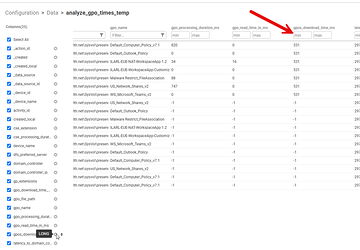
Hopefully this doesn’t resurface for you!
Same….. added an [int] tag in front of those specific calculations
Yeah PS will do the heavy lifting there
Continue reading and comment on the thread ‘Troubleshooting Index Issue in ControlUp Academy’. Not a member? Join Here!
Categories: All Archives, ControlUp Dashboards, ControlUp Scripts & Triggers