
A user reported an issue with the "Other" bar graph not displaying any data in the Win11 Readiness Report. Another user explained that this section is meant to show data for cities or groupings that are not included in the top 7 and should not be clickable.
Read the entire ‘Troubleshooting the "Other" Bar Graph in Win11 Readiness Report’ thread below:
When we go into our WIn11 Readiness Report and click on the OTHER bar graph at the bottom of this Example picture**, we do not get any data come up like the other bar graphs. Do you guys know what data the "Other" Bar Graph should show and why we ar enot seeing any data. Any help woul be appreciated.
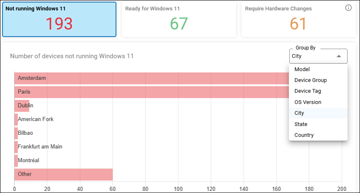
The other section is just whatever city (or grouping) falls outside of the top 7.
It should not be clickable
Continue reading and comment on the thread ‘Troubleshooting the “Other” Bar Graph in Win11 Readiness Report’. Not a member? Join Here!
Categories: All Archives, ControlUp for Desktops