
A user encountered a problem when setting up a workflow and questioned the absence of a "Delay" option. A fellow user suggested using a scheduling workflow instead. It was also mentioned that the AI tool recommended using a "Delay" node, but it seems to be unavailable.
Read the entire ‘Workflow Troubleshooting in ControlUp’ thread below:
So I’m setting up a workflow and I’ve run into a problem. I need to have a delay if the time is not correct to run the script. Doing searches and even using the AI tool. It tells me to setup add a "Delay" node to the flow. However, I don’t have a "Delay" option. I have a sleep option but its only good for 180 seconds. So, I’m trying to figure out what I’m missing here.
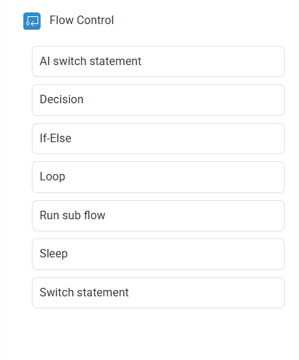
How long is the delay and what are you trying to do?
Trying to set it up so that this part of the flow only runs during a certain part of the day. If its to early, then it would wait to run it later. The AI assistant and searches had me using a delay which doesnt seem to be there.
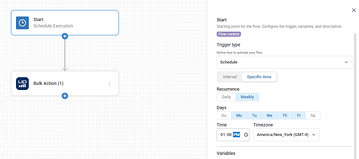
isn’t using a scheduled workflow better in that case?
Continue reading and comment on the thread ‘Workflow Troubleshooting in ControlUp’. Not a member? Join Here!
Categories: All Archives, ControlUp Scripts & Triggers