
A user in a ControlUp proof of concept asked for help confirming their setup of desktop alerts for specific event IDs. Other users suggested using double pipes between the event IDs and creating separate alerts.
Read the entire ‘How to Set Up Desktop Alerts for Specific Event IDs in ControlUp’ thread below:
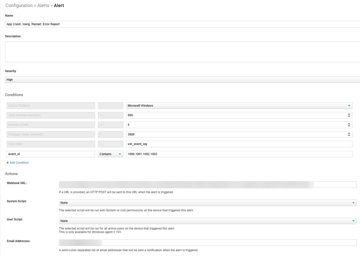
Hi all — we’re currently in a ControlUp PoC and I’m trying to set up a desktop alert for Event IDs 1000, 1001, 1002, and 1003 (app crashes, hangs, restarts, and error reports). I’ve attached a screenshot of my configuration.
Even though I know a 1001 event occurred (we’re already collecting these), I haven’t seen any alerts fire. I’ve gone through the support docs but haven’t been able to confirm whether I’m setting this up correctly or missing something.
Has anyone successfully configured alerts for these Event IDs? Any tips would be appreciated.
Not close to my PC now to confirm / test
But I believe you need to do 1000||1002||1003
Why not create separate alerts for each event ?
Will help to organize it
Thanks for the suggestion. Since I’m just getting started with testing, I wanted to group similar Event IDs into a single alert. If your approach doesn’t work, I’ll try creating separate ones.
Eugene is correct, you will need to use the double pipes ||
Continue reading and comment on the thread ‘How to Set Up Desktop Alerts for Specific Event IDs in ControlUp’. Not a member? Join Here!
Categories: All Archives, ControlUp for Desktops, ControlUp Scripts & Triggers