
A user was having trouble using ControlUp Workflows to fetch Entra ID Enterprise/App Registrations for expiring secrets and to send an email with the relevant information. Another user suggested using a specific index ([0]) to specify which entry from the list of passwordCredentials to use. They also mentioned that the passwordCredentials array can have multiple entries. The correct documentation for this feature can be found in the "auto-complete" feature within Workflows.
Read the entire ‘Troubleshooting Entra ID Enterprise/App Registrations with ControlUp Workflows’ thread below:
Hi, i’m trying to use ControlUp Workflows to fetch Entra ID Enterprise / App Registrations to fetch expiring secrets. I have managed to get the Applications (DisplayName and Object ID) and expiring Credentials:
{{Get Application Secrets (1).passwordCredentials[j].daysUntilExpiry}}
Then the flow needs to send an email about what’s the expiry date, which password credential and so on like:
“`EndDate: {{Get Application Secrets (1).passwordCredentials.endDateTime}}
PasswordCredentials:
{{Get Application Secrets (1).passwordCredentials.keyId}}
PasswordCredential Type:
{{Get Application Secrets (1).passwordCredentials.secretType}}
Password Hints:
{{Get Application Secrets (1).passwordCredentials.hint}}“`
The email body does not show the actual value, but shows like this:
“`PasswordCredentials:
{{azure_ad_get_app_secrets_1_1745793738006.passwordCredentials.keyId}}
Secrets:
{{azure_ad_get_app_secrets_1_1745793738006.passwordCredentials.daysUntilExpiry}}“`
What am i doing wrong. I used the auto-complete feature. Where to find the correct documentation.
any thoughts @member?
passwordCredentials is an array. Or phrased differently. passwordCredentials can be multiple. Entra basically tells Workflows, here’s a list of passwordCredentials. That can be 0, 1 or more
You need to tell Workflows which entry in the list you want. For example:
Days until expiry: {{Get Application Secrets (1).passwordCredentials[0].daysUntilExpiry}}
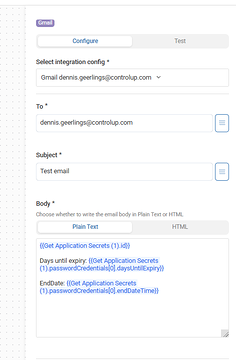
[0] being the key here. It tells Workflows, from the list of passwordCredentials Entra returns, put the first one (arrays start at 0) in the email
Continue reading and comment on the thread ‘Troubleshooting Entra ID Enterprise/App Registrations with ControlUp Workflows’. Not a member? Join Here!
Categories: All Archives, ControlUp Workflows