
In a group discussion, a question was raised about the update intervals for different data points in desktops. The company was asked for a document listing these intervals and for access to scripts that can manually update desktops on demand. A specific script was requested but it was explained that the company is moving away from using scripts in future versions. However, a different way to collect data is already in the latest version of the agent. The suggested method gets around issues with unsigned PowerShell scripts. Further information and support can be found at support@controlup.com.
Read the entire ‘ControlUp data update intervals and new agent method for collecting data’ thread below:
Hi everyone,
I learned last week that the various data points we see for desktops have different update intervals. For example, installed applications update every 24 hours, while the state of running services updates every hour.
I have two requests:
First, could you please provide a document that lists all the various intervals? It would be very helpful to know exactly when different items are updated on the back end.
Second, I learned that some customers use scripts to update desktops manually on demand. I would like to get access to these. Is there a repository for these scripts that you can share with me?
Hello Arthur
Please send an email to support@controlup.com for your first request, so we can investigate further
the current Script Library can be found at
Devices -> Configuration (top-right) -> Scripts -> Script Library

This KB article will assist in the process
Hi Abel, I’m familiar with the Scripts Library and I’ve already reviewed it. I just want to clarify whether you’re directing me to download a specific script, or simply pointing out where the library is located. The reason I ask is that I did look there and didn’t see a script that addresses what I’m looking for. For example, I’m trying to find a script that can force an endpoint to refresh its installed applications in the console without waiting the usual 24 hours. Could you please clarify what you’re suggesting so I know how to proceed?
ah! thanks for clarifying this
this action is triggered in a builtin process that calls to this script
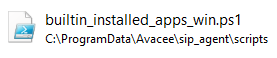
you may want to create a copy of this script and test in a couple of devices a different schedule
Oh, so that’s is where the scripts are located. Thank you.
@member the script for the application list his hard coded to 24 hours (Within the agent). Also to note we are moving away from these scripts in future versions. You can do as abel says and import the script in to CU4D. This will be changing in the short to medium future but don’t know if u will have options to run via different intervals
Understood, good to know.
You can see the new agent way (non Script) for collecting the data is already in the current agent. But it is not enabled by default as it is still in testing, not recommended to enable this with testing on your side. This way gets around the issue customers have with running unsigned PowerShell scripts
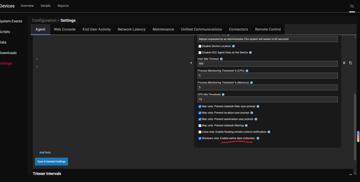
Continue reading and comment on the thread ‘ControlUp data update intervals and new agent method for collecting data’. Not a member? Join Here!
Categories: All Archives, ControlUp for Desktops, ControlUp Scripts & Triggers