
A user asked about monitoring free space on all drives, not just the system one. Another user suggested using an advanced trigger with a filter for less than a certain value for free space. The discussion continues with examples and explanations on how to set this up in the ControlUp console.
Read the entire ‘How to Monitor Free Space on All Drives in ControlUp?’ thread below:
Hello All, is there a way to monitor free space on all drives not just system one?
Yes you can. You can also setup Alerts for example If a mapped drive is low on disk space (i.e E:).
Advanced Trigger / Logical Disk View.

Also in the machines view there is Min Free Space Drive. This column is dynamic and shows the drive letter with the least amount of space and what that is.

Thanks Landon, but what filter would i choose for the trigger to monitor?
Depends on what your after. If you use an advanced trigger your in charge. If you want all disks you can simply use a less than value on free space. Or you can get more elaborate like free space
Min Free Space Drive
Amount of free space available on the most occupied fixed drive. By default, all local fixed drives are evaluated. Note: ControlUp supports excluding drives from free space calculation by using the following registry settings on the managed machines(s):
Registry Key: (create the ExclusionRules key if it does not exist):
HKEY_LOCAL_MACHINE\SOFTWARE\Smart-X\ControlUpAgent\ExclusionRules
Value: Drives
Data Type: REG_MULTI_SZ
Data Values: Enter a drive letter (without “:”) on a separate line for each excluded drive.
This value may be created simultaneously on multiple computers by using the Registry Controller. The ControlUp Agent (cuAgent) service needs to be restarted for this change to take effect.
I am trying to get alerted when drive D free space is below 5GB
Then thats your filter… 🙂
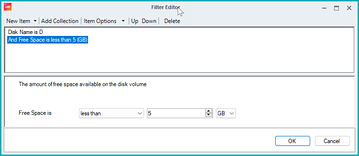
am i blind? I cannot see Disk Name

Change the trigger type from Machine to Logical Disk
Different table…
https://support.controlup.com/docs/logical-disks-view
Basically when setting up a trigger find the relevant view and columns in the console FIRST. Once you have that you can then pick the right view in the advanced trigger and add the relevant columns to the filter.
heh, stupid me. Thanks a million
And I didn’t do that for my example apparently. The right value would be D:\ as seen here.

trying these filters but it is not triggering
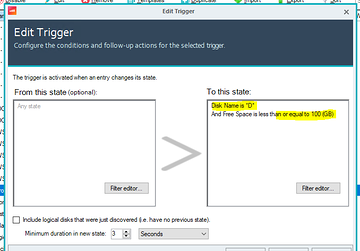
free space on the disk is about 42gb
Needs to be D:\
And it will only fire for something that CHANGES into that threshold.
If you check that box to include discovered and then restart the monitors it should fire.
great that did it
again thanks a lot
Continue reading and comment on the thread ‘How to Monitor Free Space on All Drives in ControlUp?’. Not a member? Join Here!
Categories: All Archives, ControlUp Scripts & Triggers