
A user is trying to export historical data from ControlUp, but is facing issues with their complex Active Directory structure and use of tags. They ask for suggestions on an easier or better way. Another user suggests using the API with device queries to filter the data, and provides an explanation with practical examples. They also mention that this can be utilized in Workflows with the Get Custom Data node. It is also mentioned that the user’s desired result is possible.
Read the entire ‘Importing Tagged Data from ControlUp with API and Workflows’ thread below:
I’m trying to get some reporting together and pull it out of ControlUp to keep historical data, ideally starting with reports to make sure I can get what I want, then moving into a workflow to automate the exporting of the data to a Google Sheet to keep it long term, but I keep running into the same issue with ControlUp doing most of the work.
We are an overly complex setup due to acquisitions and divestitures or different markets over the past… 20 some years, so our AD structure is a bunch of different forests that have domains that don’t easily translate to what they are called, and because of all that we heavily use tags everywhere. Problem is I can’t then use those tags on other reports easily that I am aware of.
Is there an easy way to do that? Right now I’m being asked to come up with average logon times for each of the 30 groups (and will be a repeat task to do), but tags aren’t in mswin_logins index. My current plan is export all that data, then export the index that DOES have tags, do an outside process to move those tags to the matching computer names, and do the analysis with a script out there.
Is there an easier/better way?
I’m not really interested in making a dashboard that does average logons overall, then manually going back and changing the filter and copying the data by hand 30+ times a month every month. That feels like the manual labor that CU should be eliminating. I also would like to keep using tags, as we have that built out and I don’t want to have to maintain multiple places where tags get applied, I like the idea of set it in one place and have everything else feed off that, we bring it a new part, update it once and let it flow out to everywhere else.
I’m giving up on doing reports first and trying with a workflow to see if it works or blows everything up…
Hi Mike, I would think that your desired result should be possible. My go-to Workflows brain is currently off today, celebrating his birthday, but let me drop him a note and see what ideas he has for your scenario.
The bad: neither dashboards nor workflows can do this natively.
The good: the API can.
When you query the DAL API endpoint. You can pass a device query. The device query will filter the data query based on the results of the device query. Device query is ran against the device meta data (_device index).
What does that mean? If you run a query against and your query looks something like this (not valid JSON, just for illustration)
device_query = devices whose tags contain cool
data_query = average of logon duration
Then the API will first go and look for devices whose tag contains cool. And then insert those devices as a filter into the data query. Your data query effectively becomes:
data_query = average of logon duration WHERE _device_id is in
A more practical example.
Blue is my data query. Asking for the average logon duration.
Red is my device query. Asking for device whose tag contains cool
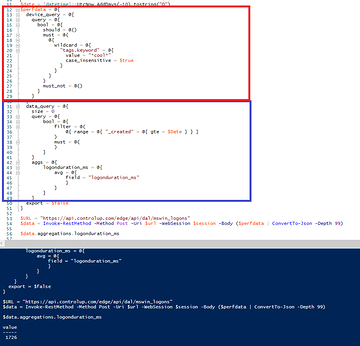
Which is effectively the same as this.
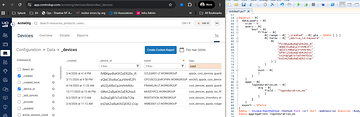
OR this if you are more of a visual person.
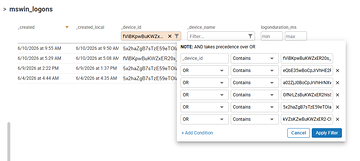
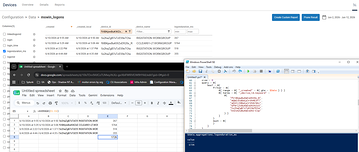
The Powershell snippet to use device_query
Or the JSON if you want to use it in something other than Powershell
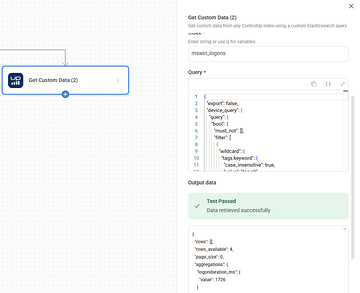
Workflows can use the device_query mechanism with the Get Custom Data node
Continue reading and comment on the thread ‘Importing Tagged Data from ControlUp with API and Workflows’. Not a member? Join Here!
Categories: All Archives, ControlUp Dashboards, ControlUp Scripts & Triggers, ControlUp Workflows