
A user asked about the "Grant Temporary Device Admin Access" workflow template and the script it runs. They wanted to know where the script is stored and what it does. Other members helped by providing the script ID and retrieving the script for the user, as well as suggesting ways to edit the template for different use cases. The script and template are available in ControlUp’s automation library.
Read the entire ‘Navigating the "Grant Temporary Device Admin Access" Workflow Template in ControlUp’ thread below:
Hi everyone,
I just came across the “Grant Temporary Device Admin Access” workflow template and it is really impressive. I see that it runs a script called “Make the logged on user admin (run script)” with script ID Qcs0hZkBmBzDUed1GY2V.
Can someone point me to where I can view the contents of this script? I am interested for two reasons. First, I would like to understand exactly what the script is doing. Second, I want to know where these scripts are stored in general.
I checked under Devices > Scripts, but I do not see it listed there.
Hey Arthur, hope all is well.
I’m tagging @member who "owns" publication for our community scripts and might know if this script is going to be available from the script library. Where did you see it mentioned?
Please note that script IDs are tenant specific and created upon import so typically irrelevant in finding them
Hey Joel. So I started here

…and noticed it here after adding the workflow.
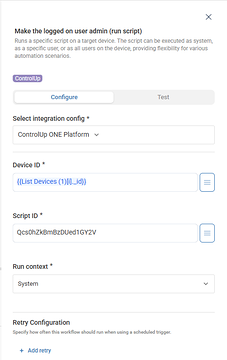
…at end it sends a message with "You have admin rights for 4 hours". So I’d like to know how it does the four hours and how to change it to something else
I really hope this workflow is fully functional. If not, that would be disappointing, since the script itself is the core of the solution.
Got it. Interesting.
So that id is the script Id in controlup for Desktops. If you navigate to Devices -> Settings -> Scripts
In there, just select any script and change the URL to use the id from the template. What happens?
I went there first and don’t see it. I also looked at Script Library to import, but I do not see it there either.
So I need the actual script that grants local admin rights.
Got it. I know we’ve been working on a way to import a script automatically when using a template, but I don’t think that work was completed yet. Let me check from my desk in a minute
Yeah, there’s something not right with the id. I have a different id and it doesn’t exist.
Let me track down the script for you and separately we (CU) should have a look at that template @member
@member fyi
That would be awesome. Thank you!
Hey @member I have a lead on the script. But I don’t have the right permission to access it (it’s on an internal tenant)
@member do you have access by any chance?
Dennis is like a ninja. @member this is the script
So you can import this one in the CU4D library, then copy the script ID from the URL after import. And use that ID in your workflow template copy
This is great. Now the fun part begins. Figuring out how to make the time variable, add a front end form where someone requests access, include the requested duration, route it for approval, and then grant access once approved.
I think the template is more designed as an "ad hoc" model, but there’s smarter people in this slack than me that could probably assist
It’s a great start.
@member let me know how I can help with bringing this script to the library
Continue reading and comment on the thread ‘Navigating the “Grant Temporary Device Admin Access” Workflow Template in ControlUp’. Not a member? Join Here!
Categories: All Archives, ControlUp for Desktops, ControlUp Scripts & Triggers