
The team discusses limitations with grid panels in building a dashboard from GPO logon capture data. Suggestions to overcome limitations include using tables instead of grids, setting the index to overwrite, using group by in a table, and switching to advanced raw builder. An example code for adding multiple metrics in the raw builder is also shared. A feature request for adding group by option in grids is submitted.
Read the entire ‘Overcoming Limitations with Grid Panels in Dashboard Building: A ControlUp Discussion’ thread below:
Hey ControlUp team, I’m building a dashboard from our GPO logon capture data and running into a limitation with grid panels.
The data has multiple rows per computer/logon because a single activity_id can include multiple GPO and CSE detail records. For the first panel, I’d like to show one row per logon, grouped or aggregated by activity_id, with values like max(gpos_download_time_ms), user, device_name, domain_controller, and latency_to_domain_controller.
Is there a way in ControlUp dashboard grid panels to group, deduplicate, or aggregate rows by a field like activity_id? If not, what’s the recommended approach for building a summarized “one row per logon” panel from this type of data?
FYI @member @member
Hi Arhtur so the Grid viewer displays raw data and with VDI being sql this might be duplicate rows depending on the time frame because it’s aggregated per 5 min / hour or day. All the other widget types rely on aggregations. So there you can aggregate data. I would suggest using tables instead of grid. It might require multiple table widgets since they support just one aggregation and one group by. This limitation is btw in the GUI if in the bottom you switch to raw you can add more aggregations in the code an we are working on updating the UI for this too.
Hi Chris, let me see if I can follow. To clarify, this isn’t VDI, it’s a GPO script Trentent wrote to capture login data (similar to how VDI does it), and we’re running it via Device > Scripts.
I’ve attached a screenshot of the panel. Since the gpos_download_time_ms stays the same for a single user, my goal is to deduplicate this so we only see one Activity ID instead of a list of identical rows.
Can you walk me through the best way to group or filter these so the view stays clean?
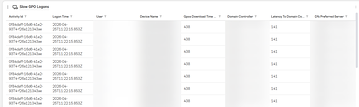
Hi Arthur, so you have the same issue as VDI duplicate data. I would advise in this case to set the index to overwrite (in the script section) so you just return a single row that gets overwritten. If this is not possible make a table select a metric you want to sort on then select group by and activity id should do the trick.
@member
I don’t think I want to overwrite the data because it may be important to compare one day when a computer has a fast login versus another day when it does not.
Because of that, I think overwriting is out the window.
I’ll look at your suggestion of using a table and see how that might work. Thank you again.
I’ll submit another feature request, as it would be nice if the Group By option could be used in a grid. That would literally resolve my issue.
Yeah we can’t do that GRID is raw data. And uses paging.
BUT again very very soon you can make a table with multiple metrics with group by.
It is already possible if you switch at the bottom of the builder to the advanced raw version. We are working on a new UI to add multiple metrics as we speak
If needed I can send you a json example of how to add multiple metrics in the raw builder
*tomorrow
Yes, please. Seeing an example, will be very helpful.
I figured it out! I think.
“`{
"queryConfigs": [
{
"version": "1.0",
"dataSource": {
"product": "edge",
"entity": "analyze_gpo_times"
},
"query": {
"select": [],
"aggregates": [
{
"metric": "gpos_download_time_ms",
"as": "fa6f4b79-76dd-458b-8b4b-70aa9ae9179f",
"fn": "max"
},
{
"metric": "latency_to_domain_controller",
"as": "max_latency_to_domain_controller",
"fn": "max"
},
{
"metric": "gpo_download_time_ms",
"as": "max_gpo_download_time_ms",
"fn": "max"
},
{
"metric": "gpo_processing_duration_ms",
"as": "max_gpo_processing_duration_ms",
"fn": "max"
}
],
"groupBy": [
{
"metric": "_device_name",
"as": "1fbed85e-9050-44dc-bf8b-5c8d2ce9b3a0"
}
],
"sort": [
{
"by": {
"aggregate": "fa6f4b79-76dd-458b-8b4b-70aa9ae9179f"
},
"direction": "desc"
}
],
"filters": {
"metric": "gpos_download_time_ms",
"op": "gt",
"value": "2000"
},
"limit": 50
}
}
],
"transformations": []
}“`
looks about right!
nice Arthur 🔥
Thanks, Luke!
Awesome !
Continue reading and comment on the thread ‘Overcoming Limitations with Grid Panels in Dashboard Building: A ControlUp Discussion’. Not a member? Join Here!
Categories: All Archives, ControlUp Dashboards, ControlUp Scripts & Triggers