
A member reported that after replacing the agent on the AVD Session Host, they were only receiving partial data. They were still getting data on "Logon Duration" but not on CPU utilization. After troubleshooting, it was determined that the monitor server was causing the issue, but it has since been resolved.
Read the entire article here...
CPU Related Training & Support Archives
CPU training and support-related archives from inside the ControlUp Community on Slack.
When AI Helps, When It Doesn’t: Notes From a Fireside Chat on IT’s Next Chapter
In our latest ControlUp Community Meetup, Co-Founder Yoni Avital, ControlUp expert Eugene Kalayev, and Shane Kleinert from Choice Solutions sat down for a fireside chat on where EUC is headed. The panel tackled the big question: where does AI actually fit in EUC operations?
Read the entire article here...

Read the entire article here...
Troubleshooting High CPU Utilization on ControlUp.
A user was unsure how to interpret the value 190% in a discussion with @member. @member recommended providing more hardware and CPU details for further investigation. It was later discovered that the issue was due to agent deployment with multiple devices reporting under the same ID, causing the CPU load event to be summed up incorrectly. The post serves as a helpful reference for others experiencing a similar issue.
Read the entire article here...
Read the entire article here...
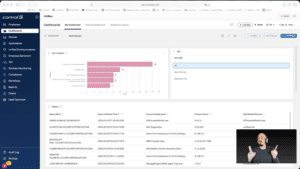
Widget Wednesday #15: Advanced Dashboard Filters — Simpler, Smarter, Global
Widget Wednesday #15 introduces advanced global filtering in ControlUp Dashboards, enabling more precise, real-time filtering across devices, attributes, and conditions without complex variable setup.
Read the entire article here...
Read the entire article here...
Troubleshooting Login Slowdowns: How ControlUp Can Help
A user asked for help with login slowdowns and received suggestions to use CU4VDI trigger to run the ALD script, deploy ControlUp Disk Monitor, and run API queries to gather data. The AI Assistant or Claude/Gemini/ChatGPT can be used to correlate the data and determine the root cause of the issue. The ControlUp PS team is also available for assistance.
Read the entire article here...
Read the entire article here...
How to Zoom in on CPU Utilization Graph in ControlUp’s Session Activity Report
A user inquired about zooming in on the CPU Utilization graph within the Reports -> Session Activity report for VDI. Another user shared that clicking and dragging on the graph will zoom in on the desired time period. This was found to be easier than expected.
Read the entire article here...
Read the entire article here...
Improving Understanding of CPU Queue Events in ControlUp
The group discussed how to better understand the details behind CPU queue events in ControlUp for Desktops. Some suggestions included adding specific event IDs for collection and using the new active processes > threads view to identify threads waiting for CPU availability. Complications to consider include CPU spikes and threads changing state rapidly. Running a WPA CPU trace may provide a better understanding of thread queueing.
Read the entire article here...
Read the entire article here...
Widget Wednesday #12: Introducing Grid Viewer for Raw Data Exploration
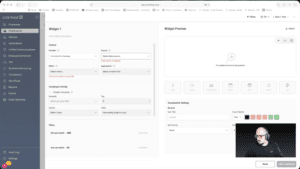
This week’s Widget Wednesday introduces a powerful new widget type in ControlUp Dashboards, the Grid Viewer.
Unlike traditional widgets that summarize data through averages, totals, or grouped metrics, the Grid Viewer gives you direct access to raw data. It’s designed for situations where you want to see exactly what’s happening under the hood and shape the view around your specific needs.…
Read the entire article here...
Read the entire article here...
Addressing Timestamp Issues in ControlUp’s PowerShell Cmdlet Invoke-CUQuery
A user is experiencing an issue with the PowerShell cmdlet Invoke-CUQuery and discusses it in a Slack conversation with @members. They expected a timestamp to change whenever a value changes, but this is not the case. They share a screenshot of the issue and mention their understanding of the documentation. Another user explains that whenCreated reflects when a computer record was created in the internal database and gives a recommendation for a better approach. The original user shares their use case for needing a timestamp that shows when a record was last changed, but is informed that this data is not currently available. Other potential solutions and a discussion take place.
Read the entire article here...
Read the entire article here...
Understanding CPU Max in ControlUp Performance View
A user asked for clarification on the CPU utilization graphs in the User Session Details / Performance view. Another user explained that the CPU Max graph shows the highest 3-seconds sample during a 5-minute period, which can cause spikes of 100% even if the host and user CPU numbers are only at 10%. The original user was directed to the documentation for further explanation.
Read the entire article here...
Read the entire article here...