
A user is experiencing an issue with the PowerShell cmdlet Invoke-CUQuery and discusses it in a Slack conversation with @members. They expected a timestamp to change whenever a value changes, but this is not the case. They share a screenshot of the issue and mention their understanding of the documentation. Another user explains that whenCreated reflects when a computer record was created in the internal database and gives a recommendation for a better approach. The original user shares their use case for needing a timestamp that shows when a record was last changed, but is informed that this data is not currently available. Other potential solutions and a discussion take place.
Read the entire ‘Addressing Timestamp Issues in ControlUp’s PowerShell Cmdlet Invoke-CUQuery’ thread below:
Hello,
I am experiencing an unusual issue with the PowerShell cmdlet Invoke-CUQuery
I expected the "whenCreated" attribute to have a different timestamp whenever a value changes. However, this is not the case.
The customer requires data to be written to an InfluxDB instance with a higher resolution than what is provided by the console output. If the timestamp does not change, this approach is ineffective, since a time-series database relies on the timestamp as a primary differentiator.
This would mean that out of my 1091 values, only the last entry would remain in the database, while the others would be overwritten due to identical timestamps — even though there are actual changes in the fields.
I call the cmdlet as follows:
($SrvQueryResult = Invoke-CUQuery @InvokeParams -Table $SrvTableName -Fields $SrvFields.Fieldname -Take ([int]::MaxValue)).Data
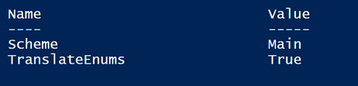
$InvokeParams
$SrvTableName –> Computers
$SrvFields is a variable used to translate the name from the console to the appropriate name for the cmdlet. (https://support.controlup.com/docs/monitor-cluster-powershell-fields-by-table#computers)
My understanding of the documentation is that there should always be a current timestamp. Can one of the experts explain to me what I am doing wrong or whether I have misunderstood the purpose of the whenCreated field?
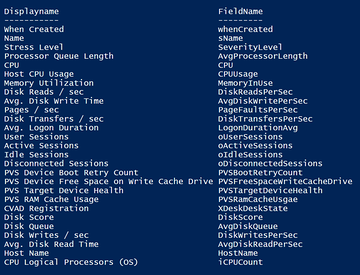
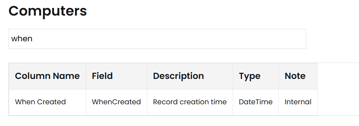
OK, I can see that the formatting via browser is a bit unfortunate. I hope you can still understand the content.
The most important thing would be this screenshot. Here you can see that the CPU load is always changing, but the timestamps on the CSV files are identical.
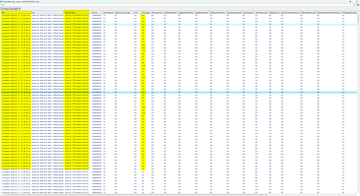
whenCreated is when the computer record was added/created in the internal database. It would NOT change when data is changed. It would only change if the agent disconnects and reconnects
($SrvQueryResult = Invoke-CUQuery @InvokeParams -Table $SrvTableName -Fields $SrvFields.Fieldname -Take ([int]::MaxValue)).Data
by the way. using export-cuquery would be the recommended approach here. It is better for the monitor cluster health
Hi Dennis,
thank you for the quick response.
With the Export-CUQuery cmdlet, the time resolution is unfortunately limited to seconds. Therefore, I decided to use Invoke-CUQuery instead. However, if the whenCreated field only reflects the initial creation of the record in the in-memory database, then it is obviously not helpful for my purpose. In that case, I would need to adjust the timestamp afterward.
This naturally introduces a certain degree of inaccuracy, but at least it ensures that all data is captured.
Would it be possible to include a field in a future release to have a timestamp showing when a data record was last changed?
That mechanism already exists. Some metrics keep a (small) history and also a timestamp when it was last changed. But that meta data isn’t exposed via invoke or export cuquery.
@member @member perhaps we talk about this offline. I only have my phone right now but it’s one of the field parameters the underlying api accesses exposes. Invoke-cuquery just always sets that option to value only.
There’s some other use cases for this. But obviously I don’t know if that justifies spending time in exposing this field parameter.
I’ll have a look at this on Monday.
Should’ve known my monday todolist always extends during the monday…
I was hoping the machine statistics API could help us out here. This does have the ‘update_time’ metric but that’s based on when that statistic has been calculated so that doesn’t help you here.
@member let’s take this further offline.
@member I had some internal conversations but there’s currently no way to expose the data you’re looking for. There are also more pressing things we need to tackle from a development perspective so it’s not coming any time soon.
Alternatively, just thinking out loud, you could add every metric to the time series DB. To make it more efficient you could compare to your last value and only store it if it’s changed (I do understand the additional effort it would take on your side).
I’m open to chat further about your usecase if you’re interested, I might be able to assist if I understand more about what you’re going to do with the data. Please send me a private message and we can organize something.
Continue reading and comment on the thread ‘Addressing Timestamp Issues in ControlUp’s PowerShell Cmdlet Invoke-CUQuery’. Not a member? Join Here!
Categories: All Archives