
A user posted a script that fails with an encoding error, and another user suggested a workaround by removing the whitespace on specific lines. The solution is confirmed to work.
Read the entire ‘Troubleshooting a Bitlocker Script Error’ thread below:
Hello – I am trying to make a script that decrypts and turns off bitlocker, this is what I have, but it fails with this error, any ideas (note script works if run independantly on the VDI) Thanks SImon
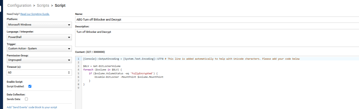
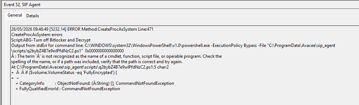
Looks like an encoding problem. Deleting the whitespace in front of the IF statement on line 5 should work around it. You’ll probably need to delete the whitespace on line 6 and 7 as well.
If you have the time. Check what the script looks like in notepad++ with symbols enabled.
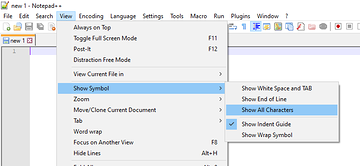
Dennis – that worked- fantastic, thanks so much for your quick reply.
Continue reading and comment on the thread ‘Troubleshooting a Bitlocker Script Error’. Not a member? Join Here!
Categories: All Archives, ControlUp Scripts & Triggers