
A user asked about the ControlUp script https://www.controlup.com/script-library-posts/show-horizon-view-usage/. An error occurred due to a missing module ("VMware.VimAutomation.HorizonView") which can be resolved by installing it with a ‘Install-Module’ command using the ‘-Scope AllUsers’ parameter. The need for the scope was explained, and additional tips were provided regarding Automated Actions and where the script should run. An update to the script will be available in the July release.
Read the entire ‘Troubleshooting ControlUp Script Show Horizon View Usage’ thread below:
Any successfully use this script? https://www.controlup.com/script-library-posts/show-horizon-view-usage/
It doesn’t list any pre-reqs but I get this error:
Import-Module : The specified module ‘VMware.VimAutomation.HorizonView’ was not loaded because no valid module file
was found in any module directory.
At C:\Users\bmarofsky\AppData\Roaming\ControlUp\Scripts\06a2cdf4-5900-483b-b54a-bfdc8170ae7c.ps1:157 char:11
- $module = Import-Module -Name VMware.VimAutomation.HorizonView -Verbo …
- ~~~~~~~~~~~~~~~~~~~~~~~~~~~~~~~~~~~~~~~~~~~~~~~~~~~~~~~~~~~
- CategoryInfo : ResourceUnavailable: (VMware.VimAutomation.HorizonView:String) [Import-Module], FileNotF
oundException
+ FullyQualifiedErrorId : Modules_ModuleNotFound,Microsoft.PowerShell.Commands.ImportModuleCommand
It needs VMware PowerCLI which includes that module. This can be installed via Install-Module
would that be installed on the machine that initiates the script or on the View server? Having a pre-reqs section of the script library might be a good idea
Needs to be installed where the script runs which doesn’t need to be the Horizon Server
I’ve passed your point about pre-reqs up the chain of command
thx
I’ll put out an update to the script – at least a #requires and an update to the notes. It should go out in the July release all being well.
thanks! I still get the same error. I’ll look more into it next week.
Keep in mind that the module needs to be installed where the script is set to run in the execution context. If it’s set to "Other Machine" in the script you need to target the machine in the console with the module. If you select "Target Machine" It will be run on which ever machine the script is running against in the console. If you select "Console/Monitor" it will be run on the console if you manually run the script, otherwise it will be run on any monitor that has the assigned data source.
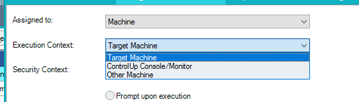
The same goes for if you’re running it as an Automated Action, a target machine would be run on whatever target where the trigger was fired, console/monitor would be run on the monitor, which in itself is a console etc
its currently set to ControlUp Console/Monitor
And the Install-Module should specify -Scope AllUsers to be sure that it’s visible to the account used to run the script. Probably obvious, but saying it anyway.
thx, not obvious to Powershell noobs like me
i ran this: Install-Module VMware.PowerCLI -Scope CurrentUser
changed to AllUsers and getting the same.. I’ll pick this up next week.
Yeah current user will only install it to your user profile, it will need to be for all users
Continue reading and comment on the thread ‘Troubleshooting ControlUp Script Show Horizon View Usage’. Not a member? Join Here!
Categories: All Archives, ControlUp Scripts & Triggers