
There was a discussion about an error message popping up when opening details for a specific device in Physical Endpoints/Dex portal. Support was contacted and a workaround for this issue has been found. A status update was provided and it was suggested to contact support. The maintenance was completed, but some users are still experiencing the error. The fix should be applied shortly, and logging out of SAML and logging back in is suggested to resolve the issue.
Read the entire ‘Troubleshooting Device Details Error in ControlUp Endpoints’ thread below:
Good morning – anyone else seeing this when opening details for a specific device in the Physical Endpoints / Dex portal? Clearing browser cache doesn’t seem to do anything.
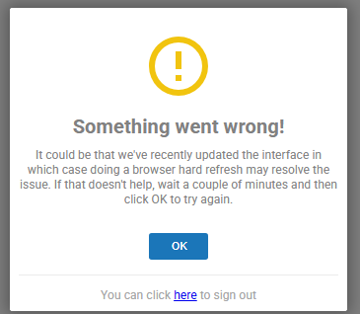
Hello Alex
Yes, this has been noted and the status page is being updated as we chat
Please send an email to support@controlup.com, including this screenshot above.
Will do – thanks for the information!
I was able to get a partial workaround for my help desk team. Appears we can still click on the device in the list view and perform remote assistance. It’s just the page showing specific device details when we click on the hostname that is having issues.
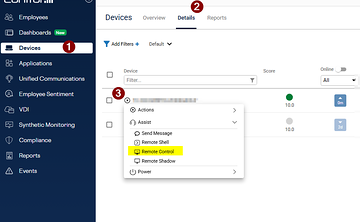
Please send this update to the Support case as well
Done!
@member

Thanks, I subscribed to the status page and have let my internal teams know about the maintenance.
@member Looks like maintenance is completed, but I’m still receiving that error. Do we need to wait a bit longer or submit a ticket?
task still running taking a bit longer than expected
If u could confirm me when it dose show as resolve for you please @member & @member
Logging out of SAML and logging back in gets this prompt
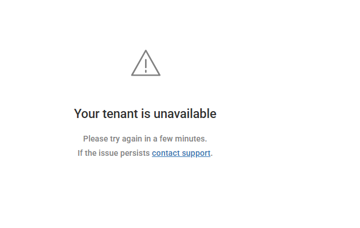
That should go in a few mins and fix should then bee applied
Looks like it’s working for me.
thanks!
I appear to still be getting the tenant unavailable prompt.
I was able to get back in – checking with my internal teams to see how its working for them.
Continue reading and comment on the thread ‘Troubleshooting Device Details Error in ControlUp Endpoints’. Not a member? Join Here!
Categories: All Archives, ControlUp for Desktops, ControlUp One Platform