
A user is experiencing frame buffer bottlenecks on their Horizon VDI machines with vGPU. They notice a high load in the machine view but all processes seem to be at 0% or N/A. Another user suggests checking system-owned processes and recommends looking at both PerfCounters and Nvidia SMI. There is an open bug for this issue, ado #298634.
Read the entire ‘Troubleshooting frame buffer bottlenecks on Horizon VDI machines with vGPU.’ thread below:
Hello,
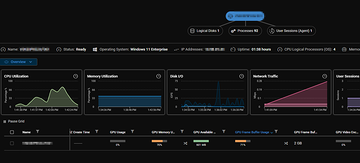
I have Horizon VDI machines with vGPU and are currently investigationg frame buffer bottlenecks.
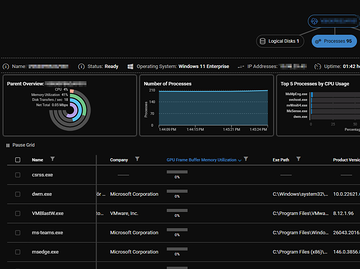
When looking at the machine view i can see that it’s currently at 71% in attached screenshot. But when I go into the process view to see what application or process it is that is causing the load, everything is at 0% or N/A. Any ideas?
Thanks!
Hi @member
By default, the UI does not show you system-owned processes, could it be that some system process is responsible for this peak?
Hi @member
Good call! Is there a good way to confirm this within ControlUp, or should I look in the VM itself or tools like Nvidia SMI?
I would say, check both
PerfCounters and nvidia-smi
we actually have an open bug for this that I verified last week for frame buffer usage on process level always returning 0%
@member pinged you in the bug but its ado #298634
@member, thanks for the update. I won’t go down that rabbit hole at this moment then 🙂
Continue reading and comment on the thread ‘Troubleshooting frame buffer bottlenecks on Horizon VDI machines with vGPU.’. Not a member? Join Here!
Categories: All Archives, ControlUp for VDI