
A user asked for troubleshooting tips regarding high logon durations on a new MCS Citrix image. Other members suggested using the analyzer and running Promon as the user logs on to isolate the issue. A reference to a helpful discussion was also provided.
Read the entire ‘Troubleshooting High Logon Durations on Citrix Images’ thread below:
Hi,
I am facing some high logon durations on a new MCS Citrix image. When running the analyzer on the users I get the following output:
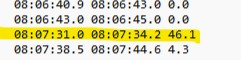
It is pretty much the same for all users on these machines, what I am wondering is how ODFC Container has a 40s gap, when we are not even using ODCF 😮
Any troubleshooting tips or ideas why this is happening?
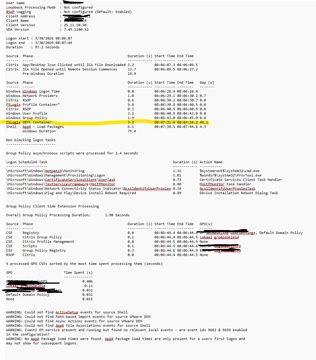
the gap is the time that happens after that step but we don’t know whats exactly happening
Are there any possibilites to find out what is causing these gaps? What are the best steps to take :thinking_face:
@member do you have any ideas (grab coffee forst buddy its Monday morning :D)
You need to run Promon as the user logos on (you need to isolate them to the server )
this will give the time stamp with Procom to look
See this from @member – https://controlupcommunity.slack.com/archives/C09EUBKM1F1/p1758218040590219?thread_ts=1758209260.477519&cid=C09EUBKM1F1
Continue reading and comment on the thread ‘Troubleshooting High Logon Durations on Citrix Images’. Not a member? Join Here!
Categories: All Archives, ControlUp for VDI