
A discussion in Slack focused on identifying the cause and how to troubleshoot a stress severity level of "error" in ControlUp. It was mentioned that these severity levels are still being added to the platform and may not currently exist, but can be addressed with a simple command on the affected system. A user also highlighted the potential issue of corrupted performance counters in Windows.
Read the entire ‘Troubleshooting Stress Severity Levels in ControlUp’ thread below:
What exactly causes a stress severity level of "error"? Or does anyone have tips on how to troubleshoot this?
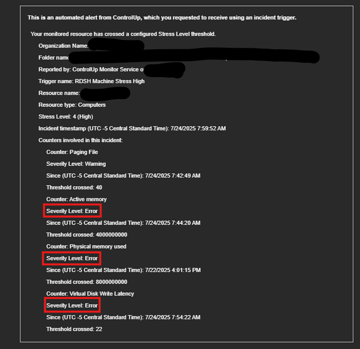
So severity levels are something that we’re still adding to the platform, which will be used for a new centralized events and incidents management. I think this email might be looking for something that doesn’t exist and probably should say N/A right now. It’s not anything to worry about, but tagging @member (Benjamin can you or Eilon check this)
Severity/stress levels are ancient Joel 😄
Error just means the performance counter we rely on for that data isn’t there or isn’t working
Windows unfortunately has a habit of getting performance counters corrupted.
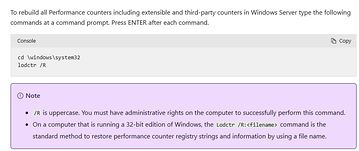
Long story short. Run
“`cd \windows\system32
lodctr /R“`
on that system and you should be good
Continue reading and comment on the thread ‘Troubleshooting Stress Severity Levels in ControlUp’. Not a member? Join Here!
Categories: All Archives, ControlUp for VDI