
A team member asked about the permissions for the Admin role in the newly launched File Browser. The ControlUp team clarified that this is by design and is meant to protect customers from unauthorized access to sensitive files. They suggested creating a separate "Super Admin" role with all the necessary permissions for RRM. More information can be found at https://support.controlup.com/docs/file-browser#permissions
Read the entire ‘Understanding Permissions for ControlUp File Browser’s Admin Role’ thread below:
Hi team, File Browser went live today and I’m reviewing RBAC. I noticed the default Admin role has several permissions that are unchecked and also not selectable (greyed out). I understand non-admin roles having restricted access, but can you clarify why the primary Admin role does not have full permissions for File Browser related operations?
Is this expected behavior by design (for example, certain permissions are only configurable on a different role type or at a different scope), or does it mean we should create a separate custom “Admin” role to grant full access? If you can point me to the correct approach or documentation, that would help.
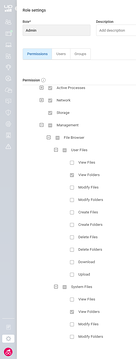
This appears to be by design
https://support.controlup.com/docs/file-browser#permissions
Its per the design the admin is limited on the RBAC for the new RRM u have create a new rile to extend the permisions
Its a pretection against admins getting access to sensitive files on a device. We dont want customers exposed with out known.
Okay, good to know. Thank you.
I have created a new role for my customers and called it Super Admin role. Just copy the Admin role and enable all the new RMM features.
Continue reading and comment on the thread ‘Understanding Permissions for ControlUp File Browser’s Admin Role’. Not a member? Join Here!
Categories: All Archives, ControlUp for Desktops, ControlUp Live Remote Management