
A user asked about the options under ‘Remote Management’ in ControlUp’s roles and permissions. It was noted that these options are currently unavailable and are part of a new feature that is in Internal Beta. There is no ETA for general release at this time. The user is looking forward to this new feature.
Read the entire ‘Upcoming Feature: Remote Management in ControlUp’ thread below:
Not sure this is the right place, but I’ll give it a go. I was going through the different roles and permissions we have in ControlUp and noticed under ‘Device Permissions’ a section called ‘Remote Management’. It has options like Performance, Network (traffic & Map View), Storage, Management (File Browser & Registry), … I tried looking up some information about these options in the Permission Reference (https://support.controlup.com/docs/permissions-reference), but these options aren’t mentioned there. Anyone knows anything about what they do or where I can find some documentation?
https://support.controlup.com/docs/remote-control-for-unmanaged-devices?highlight=unma
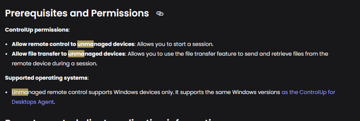
They should on the other article as well i will raise this with documentation team
actually was just looking again and see
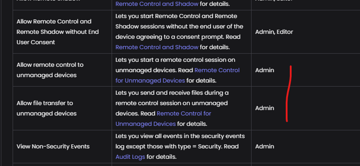
So if I understand correctly, these setting are part of the Unmanaged Devices settings? I noticed the settings in your last screenshot and found them in de Reference, but the settings I was talking about are a few items lower
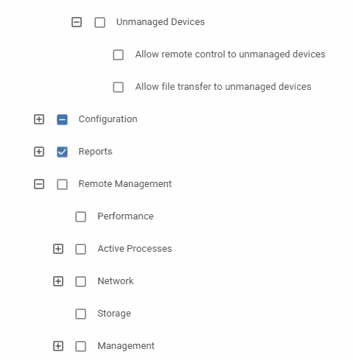
sorrry read it wrong
remote management is a new feature coming
Ah ok, based on the things I see there, I’m looking forward to this new feature 🙂. Any idea when it will be available?
P.S.: thanks for your fast reply!!
Internal Beta at the moment but i have no ETA at he moment
for General Release
No problem. Thanks for the info!
Continue reading and comment on the thread ‘Upcoming Feature: Remote Management in ControlUp’. Not a member? Join Here!
Categories: All Archives, ControlUp One Platform