
Several users discussed successfully using the Jira Service Desk integration in a workflow, with specific fields being required in the Jira ticket. Suggestions were offered on which endpoint to use and a payload example was provided. A user also asked about obtaining UPN or employee information from an alert event. It was suggested to use a list device node. The original post included JSON and a URL to ControlUp Academy.
Read the entire ‘Utilizing Jira Service Desk integration and obtaining user information from alert events in ControlUp’ thread below:
Good Morning all. Has anyone successfully used the Jira Service Desk integration in a workflow but in a scenario where the Jira ticket requires certain fields that are not present in the default fields in the workflow designer?
I’m testing using JSON but it fails the test with the message:
{
"message": "\"{\\\"errorMessages\\\":[],\\\"errors\\\":{\\\"customfield_16400\\\":\\\"Urgency is required.\\\",\\\"customfield_10003\\\":\\\"Impact is required.\\\"}}\""
}
Here is the JSON trying to run:
{
"project_key": "SD",
"summary": "Test2",
"description": "Test",
"issue_type": "Incident",
"priority": "P4",
"assignee": "",
"labels": [],
"customfield_10003": { "value": "Minor / Localized" },
"customfield_16400": { "value": "Low" },
"integrationId": "xxx"
}
are you using the /rest/api/2/issue endpoint, or the JSM-specific request endpoint ( POST /rest/servicedeskapi/request )?
Could you try the latter with this payload:
{
"serviceDeskId": "",
"requestTypeId": "",
"requestFieldValues": {
"summary": "Test2",
"description": "Test",
"customfield_10003": { "value": "Minor / Localized" },
"customfield_16400": { "value": "Low" }
}
}
Thanks @member
We were able to get this working using the HTTP node with your helpful suggestion, thank you.
Happy to help!
Sorry @member, would you or anyone know how to get the UPN or Employee information from an alert event?
We are using the following from the body below:
“` "content": [
{
"text": Alert ID: {{Start.event.id}} | Alert: {{Start.event.title}} | Severity: {{Start.event.severity}} | Device: {{Start.event.associated_name}} | User: {{Start.event.console_user_upn}},
"type": "text"
}“`
We can see the ticket being generated but the User information is not populated. It returns Null.
Hi
I don’t believe the alert brings this.
However, you can use the information from the alert, like device ID, to pull the upn value using a list device node, if available
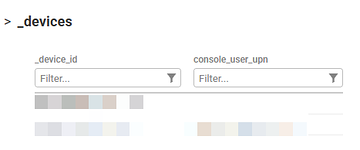
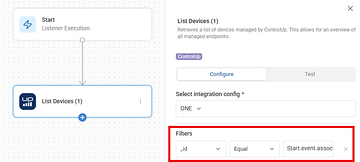
the result of this node should have the console_user_upn for your device
Continue reading and comment on the thread ‘Utilizing Jira Service Desk integration and obtaining user information from alert events in ControlUp’. Not a member? Join Here!
Categories: All Archives, ControlUp Scripts & Triggers