
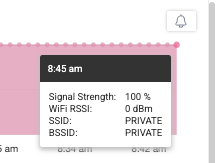
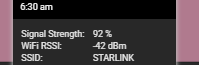
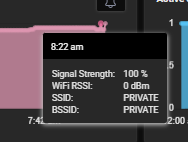
Users are reporting issues with their Windows devices where their WIfi SSID is showing as "PRIVATE" and the WIFI signal is at 100% but no data is being shown. Turning off the WIfi access location seems to resolve the issue. More information can be found at https://learn.microsoft.com/en-us/windows/win32/nativewifi/wi-fi-access-location-changes
Read the entire ‘Windows Devices Showing WIfi SSID as "PRIVATE"’ thread below:
Good Morning
Happy Friday
Anyone else see that windows devices are reporting that the WIfi SSID is showing as "PRIVATE"
and the WIFI Signal is 100% but not showing any data
https://learn.microsoft.com/en-us/windows/win32/nativewifi/wi-fi-access-location-changes

i Turn that off on my device and wifi SID went to private
Continue reading and comment on the thread ‘Windows Devices Showing WIfi SSID as “PRIVATE”‘. Not a member? Join Here!
Categories: All Archives, ControlUp for Desktops