
A discussion was had on reducing login times using Citrix Profile Management, group policies and folder redirection. AppX Load Packages and App/Desktop Icon clicked until ICA File Downloaded are taking up significant time. Server OS machines have faster AppX package loads than Client OS machines, indicating the possibility of using Server VDI. More information can be found in the ControlUp blog post at https://www.controlup.com/resources/blog/entry/logon-duration-research-appx-packages/.
Read the entire ‘Reducing Login Times with ControlUp’ thread below:
Looing at login times. Using Citrix Profile Management, the rest of the policies are GPO’s. folder redirection is MS GPO. Looking at getting some of these times lowered. Specifically the AppX – Load Packages (6.4seconds), App/Desktop Icon Clicked until ICA File Downloaded (7.2 seconds, doesnt that seem high?) and Group policy Registry (3.4 seconds) Thought about putting registry settings in WEM, but that’s another story.
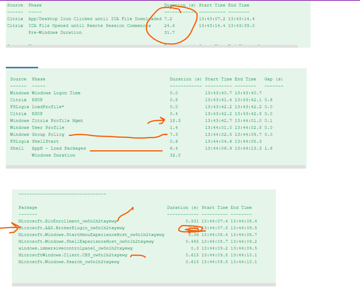

how are u getting the appx load time down i an seeing 40 – 60 seconds on some customers
just the citrix optimizer and i also used the pvs seal script
Server OS machines have AppX packages load more efficiently then client OS too. Quite significantly.
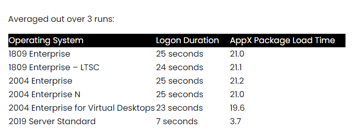
https://www.controlup.com/resources/blog/entry/logon-duration-research-appx-packages/
Kind of makes you want to run Server VDI eh?
Continue reading and comment on the thread ‘Reducing Login Times with ControlUp’. Not a member? Join Here!
Categories: All Archives, ControlUp Scripts & Triggers