
The team discussed the availability of the ai_report index in the Microsoft Copilot+ Readiness Dashboard. It was determined that a custom script is needed to populate the index and it can be found under device events. Support may need to be contacted if the script does not run automatically. A new automation and scripting dashboard has been added for more details on script runs.
Read the entire ‘Troubleshooting the Microsoft Copilot+ Readiness Dashboard in ControlUp’ thread below:
I was in on the dashboards and looking at the Microsoft Copilot+ Readiness Dashboard and saw that Index ‘ai_report’ is not available. Is that Index no available as there has been no data for it?
https://support.controlup.com/docs/ai-report-1
@member FYI
I believe the AI Report needs a custom script to populate the ai_report index.
Ah you beat me to it Joel
Hi Greg the dashboard needs a script to be run. I think we added that warning in the description of the dashboard. I’ll check it tomorrow !
I checked and I have that script enabled.
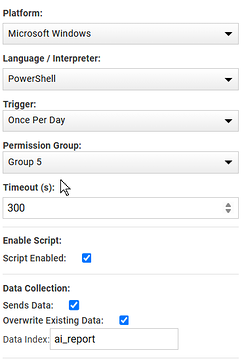
Can you check the index and see if there’s data in it?
Currently I don’t even see the index. Is there some place I can check to make sure the script is running?
system events for the machines, you can also try to run it manually and see what is returned
System Events were blank, then copied the script to my machine which has the Controlup agents on it and ran it there. When I went back to Controlup I figured where it ran on my machine that the index would then be created, but so far it hasn’t. Maybe need to open a case with support on this.
Wasn’t patient enough and now I see the index. In web console the script is showing up now under device events not system events. I know have data on the dashboard.
yeah it’s been a while since I looked at cu4d so was wrong with where they show. Now the challenge is to find why its not running automatically. Since it overwrites data you could set it to run more often
ah happy that it works now !
We also included a automation and scripting dashboard an in the details version you can deep dive script runs and see if it’s failing etc
Continue reading and comment on the thread ‘Troubleshooting the Microsoft Copilot+ Readiness Dashboard in ControlUp’. Not a member? Join Here!
Categories: All Archives, ControlUp Dashboards, ControlUp Scripts & Triggers