
The discussion revolved around ControlUp’s Agent collecting data instead of using PowerShell scripts. This new approach is currently being tested with design partners and a few other companies. It was suggested to test it with a select group first to ensure there are no issues. It was also mentioned that multiple rules can be set up with specific device tags.
Read the entire ‘Changes to ControlUp data collection: Agent vs. PowerShell scripts’ thread below:
Can i turn this on ?
does this mean no more builit scripts that will run ?
whats the good and bad on this ?
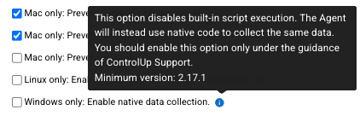
That means the Agent will collect the data instead of the PowerShell scripts. This will be the future approach, but it hasn’t been turned on by default yet and is still being tested with our design partners and a few other companies.
I have it enabled in my lab and haven’t seen any issues so far. However, I’d recommend testing it with a select group first, as any issues could affect the reports generated by the built-in scripts.
Hey Luke
Hope you are doing well
ok , will tag a few devices, how do i target those devcies only
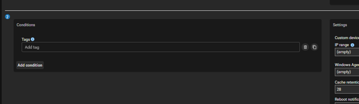
You can add multiple rules

Add conditions to each rule and use specific device tags for the rule
Continue reading and comment on the thread ‘Changes to ControlUp data collection: Agent vs. PowerShell scripts’. Not a member? Join Here!
Categories: All Archives, ControlUp for Desktops, ControlUp Scripts & Triggers