
After investigating an issue with automation, it was discovered that the issue was resolved by the YoDeck Support team within the "application" Framework. A script was provided to assist with a button click code in the automation process. A screenshot was requested for comparison after the auto-fill process is completed. A script was also provided for inputting credentials into the fields. The button is clicked after the input. The issue was resolved by YoDeck Support within the "application" Framework.
Read the entire ‘Automation Issue Resolved by YoDeck Support in "Application" Framework’ thread below:
Basically the automation is not recognizing the email and click I am curious i the button click code is accurate.
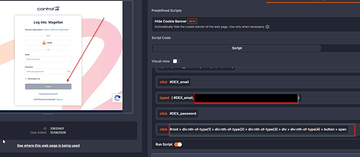
@member We are currently investigating the issue. Based on the attached screenshot, it appears that the fields are empty, which would explain why the button is grayed out.
Could you please send another screenshot after the auto-fill process completes so we can compare the results?
It pretty much the same thing Just with the creds in there.
You may close this. YoDeck Support had to fix something in the "application" Framework.
pause(5)
type("""#DEX_email""", """USER_EMAIL_HERE""")
pause(2)
runScript("""var el = document.querySelector(‘#DEX_email’); el.dispatchEvent(new Event(‘input’, { bubbles: true })); el.dispatchEvent(new Event(‘change’, { bubbles: true })); el.dispatchEvent(new Event(‘blur’, { bubbles: true }));""")
pause(1)
type("""#DEX_password""", """USER_PASSWORD_HERE""")
pause(2)
runScript("""var el = document.querySelector(‘#DEX_password’); el.dispatchEvent(new Event(‘input’, { bubbles: true })); el.dispatchEvent(new Event(‘change’, { bubbles: true })); el.dispatchEvent(new Event(‘blur’, { bubbles: true }));""")
pause(2)
clickAndWait("""button[class*=dex_AuthButton_authBtn]""")
Continue reading and comment on the thread ‘Automation Issue Resolved by YoDeck Support in “Application” Framework’. Not a member? Join Here!
Categories: All Archives, ControlUp Scripts & Triggers