
Some members of the group discussed the possibility of creating filters based on data indexes in ControlUp. One member suggested creating a custom report and using filters, but another member pointed out that this method doesn’t allow for running scripts. The original user requested a feature to allow for selecting all items from a report and running a script. The article will discuss the potential for expanding the existing feature in ControlUp that only applies to fields in the _devices index, to other indexes to make this process easier.
Read the entire ‘Creating Filters based on ControlUp Data Indexes’ thread below:
Has anyone asked if we could create filters based on the data that are in the data indexes? If not, please consider this a feature request.
create a custom report a custom report on the data u need and then u can use filters


I know how to do that.
But you can’t select all items from a report and run a script if you only do it that way. With a feature like what I requested – I could do things such as displaying devices that do not have an application installed, and run a system script to install the application in the background.
@member @member @member FYI is there something on the road map for this use case that we can share at this time.
SO there’s this, which only applies to the fields in the _devices index. To make sure I understand what you are asking, is that you want to expand that to support other indexes?
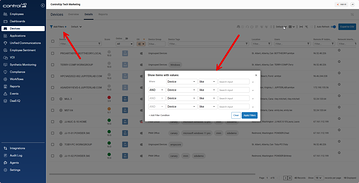
Yes! The alternative to this (using tags) is rather cumbersome. For example, I’m working on the Windows secure boot remediation project. In order to view the various stages of the rollout, I created a a Workflow that gets the data I need and then applies a tag based on field values for a device.
Continue reading and comment on the thread ‘Creating Filters based on ControlUp Data Indexes’. Not a member? Join Here!
Categories: All Archives, ControlUp for Desktops, ControlUp Scripts & Triggers