
In a Slack discussion, a user suggests detecting if a user is using the Desktop App or web version of Citrix Workspace to determine performance issues. Others mention that this can already be done using the CVAD Launch Type metric, which indicates if the session was launched from the web interface. The results can appear as "WI," "Unknown," or blank. The team plans to investigate further to bring better visibility on this topic and may consider using the client name to differentiate between the two versions.
Read the entire ‘Determining Citrix Workspace Usage for Troubleshooting Performance Issues’ thread below:
Not sure if this is possible, even when 9.2 is GA’d, but would love to see if there is a way to detect whether a user is using the Citrix Workspace Desktop App or using the Web version of the Citrix App. We have our Workspace configuration setup to deploy the Controlup agent, but thats not available in the web app so that we get some of that performance data so that when they say its running slow we can figure out if it more client related or Citrix related.
Actually, you can already do this:
There is the CVAD Launch Type metric which indicates if the user is using the web version (WI) or the Citrix App – this is session metric we have added in the latest 9.1.5.445 version
I have added that column and seeing some connections listed as WI and others as unknown, as I thought I would have seen Workspace App or something along those lines.
WI and Unkown are reported values by Citrix. If WI is reported, it’s almost certain that the session was launched from the web interface
Out of curiosity, do you see any other values than "WI" or "Unknown"?
Some just show up as blank. In this screenshot its the first time I have seen outdated.
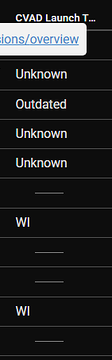
Hmm, nothing too much we can do about at this point. We will think about how to bring in better visibility in this area
Maybe in the registry of the VDA there are some interesting data points – we will investigate and keep you updated
What about the client name? Pretty sure web version shows as "HTML-something"
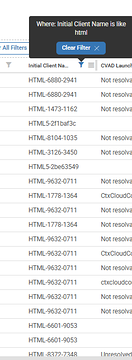
Good point! I think this should be solid
That’s what I use, client name to determine if it’s html5 or cwa. Still can’t tell if it’s cwa configured or hybrid launch but at least you can differentiate from html5
Continue reading and comment on the thread ‘Determining Citrix Workspace Usage for Troubleshooting Performance Issues’. Not a member? Join Here!
Categories: All Archives, ControlUp for VDI