
Users discussed how to include template variables such as $(Object), $(FQDN), $(ResourceType), and $(ObjectName) when creating ServiceNow events using the $CUTriggerObject. A suggestion was made to use the RESTful API or an intermediate method like a webhook or event follow-up action. @member confirmed that template variables cannot be used within the script itself, but only in follow-up actions.
Read the entire ‘Including Template Variables in ControlUp ServiceNow Events’ thread below:
Good day all,
We are working to implement a PoSH script to create ServiceNow events. We’re using $CUTriggerObject. and it’s sub classes for most variables, but really need to include data that resides within the template variables such as $(Object), $(FQDN), $(ResourceType), and $(ObjectName). Any ideas on how we can pull/expose those? We’ll call this SBA as an action in our triggers. The variables we’re interested in do not seem to be available classes from $CUTriggerObject.
Are you using the RESTful API follow up action and you are saying it does not correctly pass on template variables put in the body of the request?
Like so (https://support.controlup.com/v1/docs/using-webhooks-as-follow-up-action)
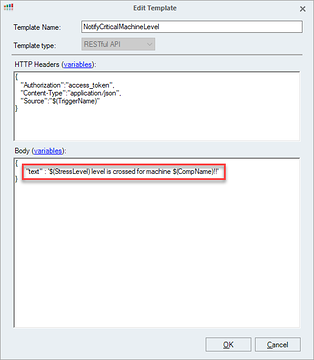
We’re not using the RestAPI, it would require us having too many templates, and quickly become untenable. We’re using a PoSH script as an SBA tied to triggers. Here’s what we’re able to include:
https://support.controlup.com/docs/automated-actions-how-to-pass-trigger-related-parameters
And we want to include data from these variables-
https://support.controlup.com/docs/template-variables
Ah ok, so I don’t think you can use template variables inside the script itself. The template variables are specifically for use in the follow up actions like email and restapi call
@member do you know?
Joel is correct. Only a subset is available in cutriggerobject
Any way to get those values using the SBA in another fashion?
You’d have to use an intermediate. I’ve shown you 2 examples
- use a webhook follow up action. The webserver receiving the webhook then processes the received data just like the powershell script would
- use an event follow up action. You’d then attach a powershell script to the event using a windows task scheduler task “when an event with these parameters is logged”
Continue reading and comment on the thread ‘Including Template Variables in ControlUp ServiceNow Events’. Not a member? Join Here!
Categories: All Archives, ControlUp Scripts & Triggers