
A user asked for help with removing users from the local Administrators group when they are not allowed those privileges. Other members suggested using a script through the Action > System Scripts or utilizing the Compliance module. The conversation also touched on using specific triggers and including tags or device groups in the criteria for running the script. Ultimately, the user was able to find a solution through the use of device tags in the Scripts capabilities. The conversation can be found in the #channel channel.
Read the entire ‘Managing Local Admin Privileges in ControlUp’ thread below:
Hi experts,
I’m looking for a way to remove users from the local Administrators group when they are not allowed to have those privileges.
I already have a script that works correctly when I run it through Action > System Scripts. The main issue is that many remote machines are often in sleep mode, standby, or offline.
How can I make the script run once without building a run once check into the script itself?
We also have the Compliance module enabled. However, the built-in script "Remove User from Local Admin Group" removes all local administrators from our Intune-managed workstations, including our fallback administrator account that we still need for installations and troubleshooting. Therefore, that option is not suitable.
Not all PCs have unauthorized local administrators. Some users are allowed to have local administrator privileges. I’m willing to create a list of PCs that needs remediation, e.g. by assigning them DeviceGrouip or Tags, but after that I am not sure how to achieve this reliably.
Hi!
This seems more to fall under the scope of the #channel channel.
Regardless, note that there are multiple triggers to chose from, depending on your needs

Perhaps SIP Service Start will be more suitable for your purpose?
I could use one of those options, except there doesn’t seem to be a way to include tags or device groups in the criteria. I don’t want to run the script on all devices, only on selected ones….with certain tags.
you don’t have this option available?
bottom one
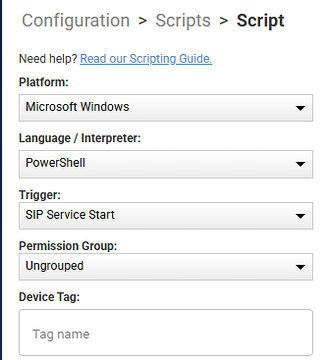
Yes i do! I have not notice it before. Will try out tomorrow.
Confirmed working. I’m glad that Scripts allows the use of Device Tag’s on contrary to Compliance where we can only use Device Group’s because Tag’s option is grayed out..
Continue reading and comment on the thread ‘Managing Local Admin Privileges in ControlUp’. Not a member? Join Here!
Categories: All Archives, ControlUp for Compliance, ControlUp Scripts & Triggers