
Users discussed options for triggering scripts in ControlUp. One option is to use the $cutriggerobject variable with the .NET engine, while another is to pass parameters explicitly. It was also mentioned that a filter in the trigger will not work with two different gateways with the same name and IP. It was decided to use collections for this purpose. Despite the busy weekend ahead, one user plans to finish an article for their website.
Read the entire ‘Triggering Scripts in ControlUp: Options and Recommendations.’ thread below:
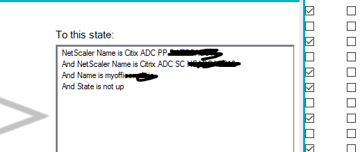
I have a trigger that i want to attach a script action, I want to pull the variables into the script but not sure on how they would be Processed. There is two different NetScaler’s with a a Gateway with same name and IP on each one, the alert is to let me know of the status of the gateway on both NetScaler’s is not equal to up. Not sure how the Name and state variable’s will process into arguments?
2 options:
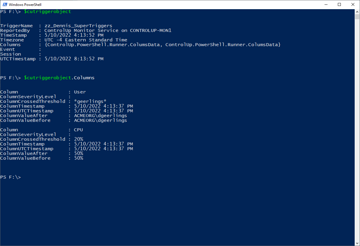
Option 1, cutriggerobject
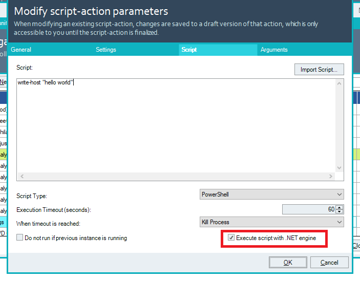
If you run the script using the execute script with .NET engine you’ll have access to a variable inside the script named $cutriggerobject. It’ll contain meta data about the trigger invocation. See https://support.controlup.com/docs/automated-actions-how-to-pass-trigger-related-parameters
Thanks, will have a look at that on monday your a star i had not seen that article
Option 2, script parameters
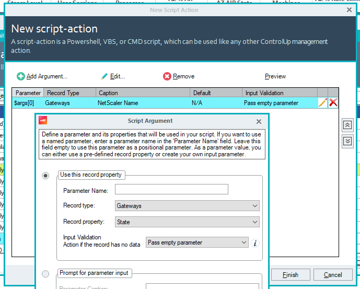
Alternatively you can pass parameters explicitly. This allows you to pass values that aren’t part of the trigger filter.
Do note that if you use parameter names, you’ll have to add a param block.

Last but not least. Your filter will never work. It only works against a gateway that whose name is both Citrix ADC PP AND Citrix ADC SC. Which is impossible. ‘
tat should be an Or but yes i think i need to us collections
but it s friday my brain is already thinking it after 17:00
😄
Long weekend for US based people as well
haha lucky u
i got busy weekend want to finish an article for my web site and get some opinions on it before doing all the social media thing on it next week
Continue reading and comment on the thread ‘Triggering Scripts in ControlUp: Options and Recommendations.’. Not a member? Join Here!
Categories: All Archives, ControlUp Scripts & Triggers