
A webhook payload in JSON format was causing issues when trying to convert a ControlUp Advanced Trigger template. The user received suggestions on how to properly format the JSON, including using the correct variables and escaping newline characters. The issue was also discussed in a previous Slack thread.
Read the entire ‘Troubleshooting a Conversion from ControlUp Trigger Template to JSON and Webhook’ thread below:
This is an absolute long shot and I totally understand if it’s something that just can’t be answered easily.
I took the ControlUp Advanced Trigger template and attempted to convert it to JSON format for a webhook.
Tried doing it myself, used ChatGPT, and even gave Claude a shot.
The challenge is: no matter what I try, the Columns involved in this incident section never renders the values. Everything above it works perfectly.
Here’s how it renders right now:
“`The monitored resource has matched the conditions specified below.
Organization Name:
Folder name:
Reported by: ControlUp Monitor Service on
Trigger name: AAS_Analyze Logon Duration above 240 seconds
Resource name:
Resource type: Sessions
Stress Level: Advanced
Incident timestamp (UTC -5 Central Standard Time): 8/5/2025 9:04:01 AM
Columns involved in this incident:
$(ListOfColumns:" Column: $(Column)
Value changed from $(ColumnValueBefore) to $(ColumnValueAfter)
On (UTC -5 Central Standard Time): $(ColumnTimestamp)
Threshold crossed: $(ColumnCrossedThreshold)
")“`
Here’s the JSON I’m using for the webhook payload:
“`{
"text": "The monitored resource has matched the conditions specified below.\n\tOrganization Name: $(OrgName)\n\tFolder name: $(CUFolderName)\n\tReported by: $(ReportedBy)\n\tTrigger name: $(TriggerName)\n\tResource name: $(ObjectName)\n\tResource type: $(ResourceType)\n\tStress Level: Advanced\n\tIncident timestamp ($(Timezone)): $(Timestamp)\n\tColumns involved in this incident:\n$(ListOfColumns:\"\t\tColumn: $(Column)\n\t\tValue changed from $(ColumnValueBefore) to $(ColumnValueAfter)\n\t\tOn ($(Timezone)): $(ColumnTimestamp)\n\t\tThreshold crossed: $(ColumnCrossedThreshold)\n\")"
}“`
Not sure if we have any JSON or ControlUp webhook gurus here who’ve successfully gotten this to work — would love any pointers or confirmation on whether $(ListOfColumns:…) is even supported in this context.
I searched and saw that someone else already asked the same question.
The linked issue is different I think. Mathias is having an issue where the payload is getting converted. But listofcolumns will add a newline character between each column. Which a lot of platforms don’t like (for example SNOW)
Your JSON seems to be attempting to escape the variables. What you paste in the payload section in ControlUp doesn’t need to be valid JSON. The monitors will replace the variables at runtime, therefor making it valid JSON at runtime.
You’ll want to use a format like this.
“`{
"description": "$(ListOfColumns:"The column:$(Column) has changed from $(ColumnValueBefore) to $(ColumnValueAfter)")",
"category": "Logon",
"cmdb_ci":"$(compname)",
"subcategory": "AverageLogonDuration",
"urgency":"4",
"priority":"4",
"short_description":"$(TriggerName)"
}“`
Or for your example:
“`{
"text": "The monitored resource has matched the conditions specified below.\n\tOrganization Name: $(OrgName)\n\tFolder name: $(CUFolderName)\n\tReported by: $(ReportedBy)\n\tTrigger name: $(TriggerName)\n\tResource name: $(ObjectName)\n\tResource type: $(ResourceType)\n\tStress Level: Advanced\n\tIncident timestamp ($(Timezone)): $(Timestamp)\n\t $(ListOfColumns:"The column:$(Column) has changed from $(ColumnValueBefore) to $(ColumnValueAfter)")"
}“`
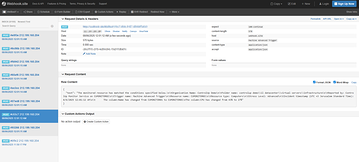
resulting in
Thanks, Dennis, for the suggestion. I don’t think I can use it as-is since Google Chat has strict requirements for the JSON format. Our pre-sales engineer might try to set up a call with both of us so the three of us can work through it together.
Continue reading and comment on the thread ‘Troubleshooting a Conversion from ControlUp Trigger Template to JSON and Webhook’. Not a member? Join Here!
Categories: All Archives