
A company member received an invite to join a ControlUp instance but received an error upon clicking the invite link. It was clarified that the invite was for the legacy Insights reporting section, which is being deprecated. The best way to access the same information is through the DEX or Solve interfaces. It was suggested to check for permissions under the security policy and reach out to a customer success manager for further assistance.
Read the entire ‘Troubleshooting Access to ControlUp Reports’ thread below:
Received an invite to join someones ControlUp instance, after clicking on the link and putting in my email (that the invite went to), I get this error:
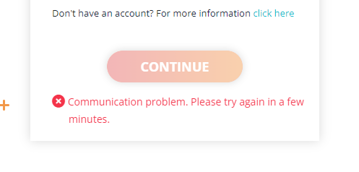
Is that Insights?
Yes
Was an invite sent via the Real Time DX console
And have you logged in that environment before
no, I’ve been invited as a new user
under Logon User in the Console
The particular invite you were sent is unfortunately poorly designed. It was intended to invite existing users to use a different (new at the time) area of the product.
However, naming the button “invite coworkers” or something to that extent was poorly thought out.
I believe the button is gone in 9.x. Just in time for the entire section to be deprecated/replaced.
Long story short. The button doesn’t do anything for anyone that isn’t already a “member” of that organization. Which you won’t be unless you’ve opened the ControlUp console, like Joel said.
Your best bet is to use the app.controlup.com interface. Assuming your organization has activated that. Else, solve.controlup.com.
That ☝️:skin-tone-2:
Thanks for the info, I’ll check it out and get back to you.
so the invite I got sent was
https://insights.controlup.com/Orchestrator.aspx?action=auth&id=b09f…………………..
So that will go no where now?
Not unless you already have an account. The invite isn’t so much an invite in the sense that it adds you to anything. It’s essentially just a link
Imagine it’s like a LinkedIn link to someone’s profile or a group. You still need a LinkedIn account to do anything with the link.
Except that for insights you can’t sign up for an account on the website itself. One of the reasons we’re deprecating it.
ok thanks, they are testing by adding me in rather than inviting me
same issue, any other way around it?
What do you mean with "adding you"? Have you logged into the Windows console and created an account?
Or, have they added you to the solve or dex interface
it seems to be trying to SSO me in rather than let me create an account.
When I launch the console it goes straight to selecting an organisation, when I select the right one I get the Login Error
Are you launching the console from a machine that’s on the domain of the environment you’re trying to select?
It might be better to jump on a call with a customer success manager or sales engineer
yes to the domain question.
The person that added you followed these instructions? https://support.controlup.com/v1/docs/add-users-to-controlup
just passed on the instructions to get them to confirm
Make sure your user account has permissions to use the Real-Time DX console.
However, since this thread started about Insights, which is our legacy Historical data reporting, just going through DEX or Solve should provide you with the same information https://support.controlup.com/docs/vdi-and-daas-reports
But it could still be a permission issue under security policy
Carl, feel free to DM me the customer account details and I can have a look tomorrow morning if there’s a customer success manager assigned.
working with them at the moment directly to see how far I get
Continue reading and comment on the thread ‘Troubleshooting Access to ControlUp Reports’. Not a member? Join Here!
Categories: All Archives, ControlUp for VDI