
A user was having trouble selecting a monitor in the Settings – the solution was to add a monitor through the console tree, connect to it, then go back and the monitor should appear. This issue is resolved! Welcome to ControlUp Academy – please keep discussions in a single thread for organization. The user also expressed gratitude for help setting up Landon. Certifications are also available on the Academy platform.
Read the entire ‘Troubleshooting Monitor Selection in ControlUp Settings’ thread below:
When I go to Settings and try to select my Monitor, it’s empty, any ideas? Monitor is configured for site.

first of all: welcome!!!! Please use a single thread that keeps things organized. You first need to add a monitor to the tree with machines with the CU agent. After you are connected you can select it
but if you plan to use saml you don’t need this, also if you try our new v9 version this will go away completely
That dialog only shows machines you are connected to in the console. Close that dialog, connect to the machine, and then go back and you should see it.
Thank you all, I think this is what I need, where I would add the Shared Credentials afterwards. I was trying to use Other Machine and finding the monitor server, I needed to select ControlUp Console/Monitor. I believe you were the one working with us to setup Landon. Speak to you tomorrow on that meeting,
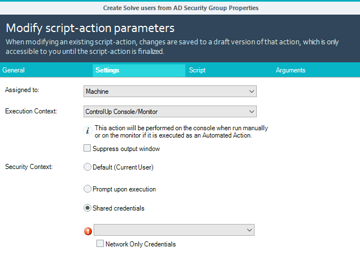
That script should be set to other machine and select a monitor. It can’t run from the console as the console doesn’t have the commandlets.
okay, so when you said "connect to the machine, and then go back and you should see it" where am I connecting from? Apologies, still learning how to navigate
The machine should be added to the tree on the left and then you deploy the agent and then connect to it. All from the tree.
Perfect, got it now, thank you very much
Continue reading and comment on the thread ‘Troubleshooting Monitor Selection in ControlUp Settings’. Not a member? Join Here!
Categories: All Archives, ControlUp Scripts & Triggers