
A user has questions about workflows and how they can be used for different scenarios. They asked about accessing data from the ‘List devices’ node, filtering data from strings, and querying data using elastic search. Another user suggested setting up a call with one of their team members for assistance. It was mentioned that ControlUp is working on addressing the limitation of only having 39 out of 222 fields available from the _devices index. The user also asked for clarification on parsing data from a structured array. A member of the ControlUp team explained that OS disk configuration is a string encoded JSON value and will need to be parsed. The discussion can be found at https://cuacademy.controlup.com/.
Read the entire ‘Using Workflows for Different Scenarios: Questions and Discussions on ControlUp Slack Channel’ thread below:
Hi everyone,
I’m new to workflows, but I think it has great potential. I’ve started experimenting with a few different integrations and tried to make some small workflows. Along the way I had a few issues which lead to some general questions about workflows.
I have two use cases at the moment
- Scan all devices and check the free disk space. If it’s less then 10%, add the device to an Excel list. The data I want in the Excel list is serial number, percentage free space, absolute free space and total disk capacity. Later I want to add extra steps (mail the list to someone, create a Jira ticket, run a script that automatically deletes some files, …)
- Remove a certain software from all devices that have that software installed. We are decommisioning a few applications and want to remove the software from all devices that have the software installed. In this case it’s an AppV package. We already have a script that lists all AppV packages on all devices and collects the data in a data index.
a. I started with a workflow that created an Excel file and added some headers. I used the ‘List devices’ node to get all my devices and added a loop. I had a look at the available data from this node. At first I thought this node used the ‘_devices’ data index, but it seems not all data is available (os_disk_configuration_freespace_all and os_disk_configuration_usedspace_all are not). Fortunatly it has os_disk_configuration which has practically the same data.
b. Question 1: what data index does the ‘List devices’ node use? Can we view that data index somewhere (just to check what’s available to use)?
c. Inside the loop I iterated through the devices and was able to add serial_number and os_disk_configuration to the Excel file. I used this value: [[{{List Devices (1) [i].serial_number}}, {{List Devices (1) [i].os_disk_configuration.drive_letter}}]]. The os_disk_configuration looks something like this: [{"drive_letter":"C:\","volume_label":"Windows","format":"NTFS","root_directory":"C:\","drive_type_string":"Fixed","free_space":837533782016,"capacity":1013309239296,"encrypted":1}]. This gives me more info than I need. I just want to add free_space and capacity. I tried something like {{List Devices (1) [i].os_disk_configuration.drive_letter.free_space}}, but that didn’t work.
d. Question 2: what syntax has to be used to filter certain data from a string? Or is it only possible to use string manipulations?
a. I created a flow that starts with the ‘Get custom data’ node. I would like to filter the devices that have the AppV package installed and run a script on those devices to remove the AppV package. I tried to find some documentation on the syntax used in these queries, but didn’t really find anything in the ControlUp website.
b. Question 3: What query language is used for this queries? Is it something ControlUp created or is it something that already exists? Is there any documentation available about the syntax of this language?
Hey Bavo, since there’s quite a few questions, maybe it’s easier to set up a call with one of our Games, but I’ll try to tackle some of them
1a+b) correct, we only by default do about 39 of the 222 available fields from the _devices index. We’re discussing internally to address this limitation
1c) I think you’re close, try to remove the .drive_letter part
1d) just the leftover string or is it coming back as a structured array?
Question 2: there’s a flow for this already which might be posted in this channel. We are planning to add this to the templates
2b) elastic search queries. Copilot/Gemini/chatgpt is your friend
Btw 2b) this is for "get custom data" in the Desktops node
Hi Joel, thanks for your response.
• 1 a+b) There is a lot of interesting info in the _devices data index, so having more (or all) fields available would be nice, but for now the 39 fields are good enough to start with for me.
• 1c) I removed the .drive_letter, but it still gives me the full os_disk_configuration.
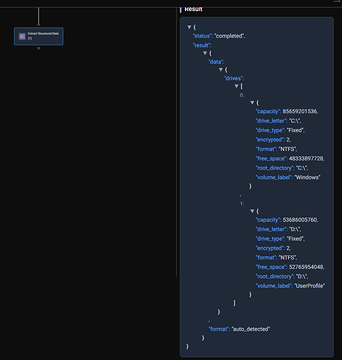
• 1d) os_disk_configuration looks like this: [{"drive_letter":"C:\","volume_label":"Windows","format":"NTFS","root_directory":"C:\","drive_type_string":"Fixed","free_space":837533782016,"capacity":1013309239296,"encrypted":1}]. Seems to be a structured array, but according to workflows, it is just a string.
• 2b) At the moment I was indeed using Copilot to assists me, but I have a look at elastic search queries.
Thank you for the assistance. I think I can do some more tests. If you would have some extra info on 1c/1d, that would be nice, but for now I’ll try some String manipulations.
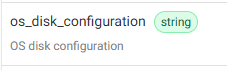
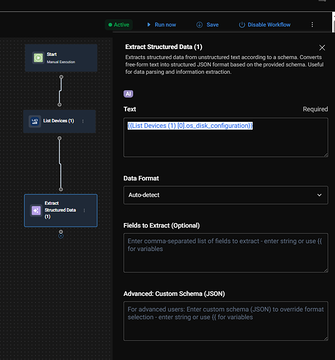
OS disk configuration in raw data is a string encoded JSON value. You will have to parse that.
Continue reading and comment on the thread ‘Using Workflows for Different Scenarios: Questions and Discussions on ControlUp Slack Channel’. Not a member? Join Here!
Categories: All Archives, ControlUp Scripts & Triggers, ControlUp Workflows