
• Skip to primary navigation
  • Skip to main content
  • Skip to primary sidebar
  • Skip to footer
ControlUp Community

ControlUp Community

Connect, Learn, and Grow

  • Blog
  • Archives
  • Findings
  • Videos
  • Categories
    • ControlUp One Platform
    • ControlUp for Apps
    • ControlUp for Compliance
    • ControlUp Dashboards
    • ControlUp for Desktops
    • ControlUp for VDI
    • ControlUp Scripts & Triggers
    • ControlUp Synthetic Monitoring
    • ControlUp Workflows
  • Topics
  • Meetups
  • Events
    • Logos & Wallpaper
    • ControlUp.com
  • Join

Using ControlUp Products to Report Remote Employees’ Network Issues

Posted on July 10, 2024

An employee asked for advice on how to report network issues for remote employees, and a colleague suggested using ControlUp products to gather data and find specific users for further analysis. The product, compatible with RemoteDX plugin, offers metrics such as LAN Latency and WiFi Signal, which provide insights into network problems.


Read the entire ‘Using ControlUp Products to Report Remote Employees’ Network Issues’ thread below:

Hi all,

My admin needs me to setup a way to capture and report our remote employees network issues on a regular basis. We initially setup a few triggers to alert client NIC speed and total session latency together. We also setup separate triggers with for each of those filters. After submitting the reports he said he needs something that dials in more or provides clearer insight into who is having problems due to home network issues regularly. Any insight on what measurement would best reflect this and/or what trigger filter would capture this info. I am still learning the environment. Thank in advance.


Hey Christina, what product(s) are we talking about?

ControlUp real-timeDX I assume from the metrics named.

Do you know if you have the RemoteDX plug-in deployed? That’ll give you pretty good insight into where latency is coming from. It will also make this data available historically.
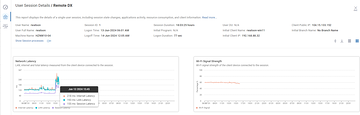

We use both, the console to create triggers mainly and remote DX for quick reference.


I’d look at these metrics. Or if you know of a particular user. Find them in the report > session activity session and click on their username. It’ll show you a set of graphs like my screenshot above

LAN Latency: Latency between the client device connected to the session and the local router

WiFi Signal: WiFi signal strength of the client device connected to the session measured in dBm displayed in percentage

Continue reading and comment on the thread ‘Using ControlUp Products to Report Remote Employees’ Network Issues’.  Not a member? Join Here!


Categories: All Archives, ControlUp for VDI, ControlUp Scripts & Triggers
Topics: Automation & Alerting, ControlUp for Remote Clients, ControlUp Insights, Reporting, Triggers, Virtual Desktops

Ask Us Anything, Connect, Learn, and Grow with the ControlUp Community!

Login to the ControlUp Community to ask us anything, stay up-to-date on what’s new and coming soon and meet other like-minded techies like you.

Not already a member? Join Today!

Primary Sidebar

ControlUp Academy

Enroll in ControlUp Academy for expert-led technical training, equipping you with skills to effectively deploy, manage, and grow your ControlUp investment.

Learn here >

Rotating Images

Hidden Gem from our Community on Slack!

ControlUp Betas - What's Coming Next?
NEW ControlUp Features - Stay Up-to-Date!
ControlUp Scripts - Scripting, Zero to Hero
Latest KB Articles - Be the First to Learn

Video Tutorials Library

Visit our technical how-to videos, offering step-by-step tutorials on advanced features, troubleshooting, and best practices.

Watch here >

ControlUp Blog

Check out the ControlUp blog for expert advice and in-depth analysis.

Read here >

ControlUp Script Library

Visit the ControlUp technical script library, which offers a multitude of pre-built scripts and custom actions for your monitoring and troubleshooting requirements.

See here >

ControlUp Support

Visit the ControlUp support home and to delve deeper into ControlUp DEX solutions.

Browse here >

Footer


ControlUp Community
Of Techie, By Techie, For Techie!

Terms of Use | Privacy Policy | Security
Dive Deeper, Learn more at ControlUp.com

  • facebook
  • twitter
  • youtube
  • linkedin

© 2023–2026 ControlUp Technologies LTD, All Rights Reserved.

We use cookies to ensure that we give you the best experience on our website. by continuing to use this site you agree to our Cookie policy..