
The discussion about how to include the device name in a ServiceNow ticket created by a workflow includes a tip to add the device name to the New Incident description as a variable. There is also a Zoom call for further assistance and a request for an update once the alert fires again.
Read the entire ‘Creating ServiceNow tickets with correct device name in workflow’ thread below:
I have a question regarding workflows that create a ServiceNow ticket. Is there a way through the workflow for it to pass on the Device Name so that it came be added to the ticket it creates. Right now the workflow create a SN ticket but doesnt include the device name so you know what device the ticket is for.
Hi Lance,
Thank you for reaching out!
May I ask, how are you triggering this workflow?
If you are triggering the workflow after an alert, it will include the associated device ID and device Name. With that, you would be able to pull the device name, and add it to the New Incident description as a variable.
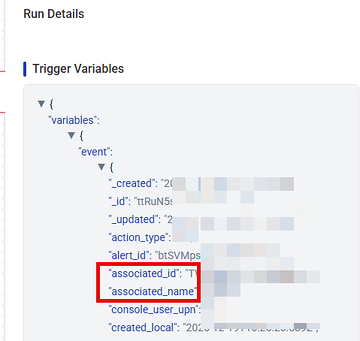
The workflow is started by a Listener Execution watching an Alert. which then trigger a script to run. It shows the following for Device ID.

it should also have associated_name coming from the Listener
{{Start.event.associated_name}}
Im not seeing it in this workflow. Really new to workflows.
got 15 minutes to spare?
Yes
https://controlup.zoom.us/j/87001532296
Thank you for joining the call. We managed to point to the correct variable in the workflow as shown above.
Please feel free to either send an update here or in the ticket once the alert fires again
Thank you for the help. I used what you showed me to get the device name added to the Short Description. However, doing more testing, the text in the main description doesnt transfer over to the ticket. It’s just blank. No idea why.
Continue reading and comment on the thread ‘Creating ServiceNow tickets with correct device name in workflow’. Not a member? Join Here!
Categories: All Archives, ControlUp Scripts & Triggers, ControlUp Workflows