
Some users reported a workflow issue where a scheduled workflow still appeared as manual, even after changing it to scheduled. Another user suggested that selecting an interval and offset time may solve this issue. The post includes screenshots showcasing the problem and solution, and a user confirms that the issue has been resolved. The team has been alerted to this issue.
Read the entire ‘Troubleshooting a Workflow Scheduling Issue in ControlUp.’ thread below:
Has anyone experienced the workflow list not recognizing that a schedule workflow (that was once manual) is still listed as manual? And upon opening the workflow to see WTH happened, it still shows as scheduled?
Hi Paul,
Have not seen this. Perhaps a browser cache issue? Will try to replicate
Create 5 manual processes and then go into each one and change it to scheduled.
I may have been working too fast for the servers. lol
also possible, lol
Managed to reproduce this
Will alert team. Thanks @member!
@member FYI
I had the same problem but that was user error (or the user interface not being intuitive).
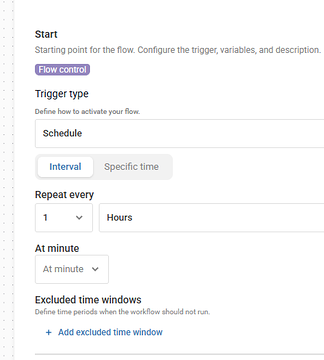
when changing from manual > scheduled, you need to specify both the interval (IE hourly) and on what offset it needs to happen (IE 5 mins past the hour, every hour). I neglected the 2nd part
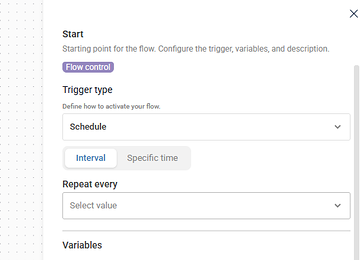
Select a value here and new interface elements appear
Pretty sure that at minute is not optional
Without at minute
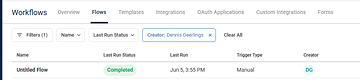
Even though the start node shows as "scheduled"
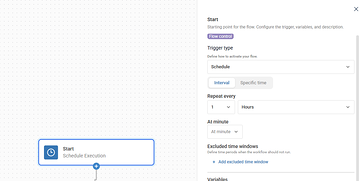
After setting at minute
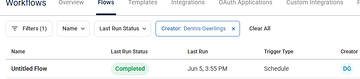
Granted, the UI should probably mark that field as required if it is required
Confirmed.
It seems to be working better now. Was able the schedule all of my workflows.
Continue reading and comment on the thread ‘Troubleshooting a Workflow Scheduling Issue in ControlUp.’. Not a member? Join Here!
Categories: All Archives, ControlUp Scripts & Triggers, ControlUp Workflows