
ControlUp users requested a PowerShell command to export all enabled triggers with configuration, and a possible solution was shared. It was mentioned that a new "alerts" portal will be available to aggregate all triggers, events, and alerts from physical, virtual, and Scoutbees, with potential for a public API in the future. This could improve IT service intelligence, mapping services to business processes. A one-time trigger export can help in understanding ControlUp’s detailed alerting process, but interested users can speak to their CSM/TSN for early access to the beta version of the new alerts portal.
Read the entire ‘ControlUp Users Discuss Trigger Export and Future Potential for Aggregated Alerts Portal’ thread below:
Hi @all, we want to export all (enabled) triggers. This is easy with PS command "Get-CUTriggers -IsEnabled $true". But is there a PS command to export all enabled triggers with config (not as json)
Mfg CMM
you’ll need to use get-cutriggerdetails per trigger and save that. json is still preferrable
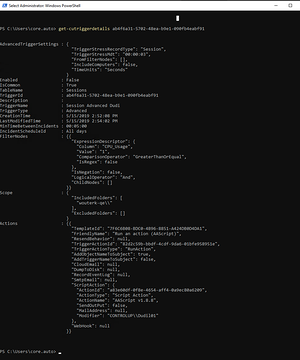
Thank you, i know this. I have to build a script with get-cutriggers(enabled) & get-cutriggerdetails. But thought there is PS command avail to list all triggers with details
Here is a (long) 😄 oneliner that gets you there… it will export a JSON per trigger, if that’s what you need… 😛
$dir = ".\CU-Trigger-Exports"; New-Item -ItemType Directory -Force -Path $dir | Out-Null; Get-CUTriggers -IsEnabled $true | ForEach-Object { $d = Get-CUTriggerDetails -TriggerId $_.TriggerId; $n = $d.TriggerName; if([string]::IsNullOrWhiteSpace($n)){$n=’noname’}; $safe = (($n -replace ‘[^\w\- ]’,”).Trim() -replace ‘\s+’,’_’); $file = Join-Path $dir ("{0}-{1}.json" -f $d.TriggerId,$safe); $d | ConvertTo-Json -Depth 32 | Set-Content -Encoding UTF8 $file }
indeed no command to get all but that nice juicy oneliner does it 🙂
@member, thank you. But i wrote a script yesterday to export all enabled trigger including settings. We plan to create a KI Portal to have a forecast when some (more then one) trigger(s) creating alarm, what can be happen and which other services / systems are going down or are affected.
it has been announced, there will be a new "alerts" portal which will aggregate all triggers/events/alerts from physical, vdi and scoutbees.
If this thing will recieve a public API then one would have a single datasource for all things happening in the environment.
I am strongly advocating for an API for this central alerts, because this will exactly enable the stuff you are probably trying to achieve without complicated scripting/exporting.
A colleague of mine explained me that this "big picture" is called IT service intelligence where you map all your services to business processes… 🙂
Sounds good, and what`s about the timeline for this ? Maybe we can save resources when waiting. Exporting out triggers is a one time export that the inhouse developer are anderstanding and knowing how CU is working and how detailed the alerting is working
talk you your csm/tsm maybe they can help with getting access to the beta
Continue reading and comment on the thread ‘ControlUp Users Discuss Trigger Export and Future Potential for Aggregated Alerts Portal’. Not a member? Join Here!
Categories: All Archives, ControlUp for VDI, ControlUp Scripts & Triggers, ControlUp Synthetic Monitoring