
ControlUp discusses using Google Chat and Gmail to send advanced desktop alerts with additional device data through webhooks. The new workflow will take a computer name from an alert, pull more data, and combine it into a single JSON payload, with the help of a List Devices node action to filter data based on device ID. Suggestions were given on how to use lists and add user information to the payload. A sample webhook and possible bug were also mentioned.
Read the entire ‘Enhancing Desktop Alerts with Advanced Device Data and Google Chat Webhooks’ thread below:
I’m trying to see if this has been done before or if there’s a how-to I can use to get started. I’m using a Listener Flow to trigger when a specific desktop alert fires for a BSOD. Right now, the email body just says: “The device triggered the alert .”
I’d like to use a Workflow with a webhook to send a richer alert to Google Chat with extra details like username, uptime, location, and IP. Is there a way to take the computer name from the alert, pull additional data, and combine it all into one message to send via webhook?
Yes. Since you use google chat, I assume you use google mail?
The Google mail creation is not super obvious but I have a sample somewhere
Now that I have webhooks working, whether the destination is Google Chat or another system no longer matters. What I need to figure out is how to combine the alert data with other data sources and package it all into a single JSON payload.
But the json formatting could be different for each tool that "receives" that array. At least for https nodes it will require some research in the 3rd party API documentation
{{Start.event.associated_name}} will pull the device name from the alert
Just put that wherever it should go in the array that will be send as the payload
If you want to bring in data about the device, you put a step in between somewhere that uses the associated_id to pull more data using the relevant CU4D node actions
Gmail is a little trickier, especially if you want to use rich text, so you need to get creative with HTML
Yep, that’s exactly what I’m looking for. Even though Google Chat is tricky, the fact that I know how to create a JSON payload means I’m good there. Now I just need to know which relevant node action in CU4D contains the data, such as the computer’s IP address or uptime.
I’ve gone through all the available node actions, and nothing stands out as “get X data.” The only one that actually retrieves data and lets me use the computer’s variable name is limited to performance data.
The good thing is I now understand the start of the flow, which begins with a listener, and the end, which is the actual webhook post. It’s the middle part where I need to insert an additional node that can use the computer name variable you highlighted earlier to extract more information.
All data is stored in indexes. However most device data would be available in the list device node action. Just use that, use a filter like device_id equals {{start.event.association_id}} and then the resulting array from that will contain all device details
And then you can just pull whatever details you want in subsequent steps
Now this is what I’m talking about. Thank you for the help!
From a desktop alert email to a webhook with enriched alert data.
Using {{List Devices (1)[0].active_users}} and {{List Devices (1)[0].active_usernames[0]}} is causing errors, so I’ll tackle that next. Adding user information will be a great enhancement to include.


Minor setback that I should hopefully be able to figure out. Right now, when I use something like {{List Devices (1)[0].serial_number}}, it always pulls the very first entry. I need to find a way to pull the entry that matches {{start.event.association_id}}. Here’s the current JSON I’m working with:
“`{
"text": "Title: {{Start .event.title}}
Description: {{Start .event.description}}
Computer Name: {{Start .event.associated_name}}
Serial Number: {{List Devices (1)[0].serial_number}}
Uptime (Minutes): {{List Devices (1)[0].uptime}}
Hardware Manufacturer: {{List Devices (1)[0].hw_manufacturer}}
Hardware Model: {{List Devices (1)[0].hw_model}}
OS: {{List Devices (1)[0].os_name}}"
}“`
Yes, hold on. I think you can just delete the [0] which I think is the first element only
But can double check
Yes, [0] is the first entry. Trying again with the following:
“`{
"text": "Title: {{Start .event.title}}
Description: {{Start .event.description}}
Computer Name: {{Start .event.associated_name}}
Serial Number: {{List Devices (1)[0].serial_number}}
Uptime (Minutes): {{List Devices (1)[0].uptime}}
Hardware Manufacturer: {{List Devices (1)[0].hw_manufacturer}}
Hardware Model: {{List Devices (1)[0].hw_model}}
OS: {{List Devices (1)[0].os_name}}"
}“`
ever mind….wrong paste
“`{
"text": "Title: {{Start .event.title}}
Description: {{Start .event.description}}
Computer Name: {{Start .event.associated_name}}
Serial Number: {{List Devices (1).serial_number}}
Uptime (Minutes): {{List Devices (1).uptime}}
Hardware Manufacturer: {{List Devices (1).hw_manufacturer}}
Hardware Model: {{List Devices (1).hw_model}}
OS: {{List Devices (1).os_name}}"
}“`
Removing [0] caused the workflow to fail and not even send anything.
Just to confirm, am I doing this correctly? Does this look right?
_id equals {{Start .event.associated_id}}
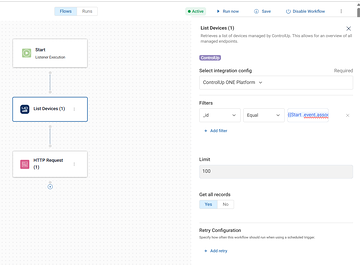
Try contains instead of equal. I think equal is supposed to work, but I might have reported a bug on that one already
Or for testing, hard code the device id in that right field to at least validate it
Great suggestion. I’ll try that next after testing contains.
Well…. contains changed the output to:
“`Serial Number: {{cu_edx_list_devices_1_1755088785480[0].serial_number}}
Uptime (Minutes): {{cu_edx_list_devices_1_1755088785480[0].uptime}}
Hardware Manufacturer: {{cu_edx_list_devices_1_1755088785480[0].hw_manufacturer}}
Hardware Model: {{cu_edx_list_devices_1_1755088785480[0].hw_model}}
OS: {{cu_edx_list_devices_1_1755088785480[0].os_name}}“`
I swapped out the variable for a specific Device ID. When I use "equals," I get the same odd results as above. When I use "contains," it still ends up grabbing the first entry, which is my laptop since it was the first computer we installed the agent on. This points to the List Devices Node as the likely culprit.
I got one of them working by using the serial_number filter with "contains" and hardcoding a serial number, which sends the correct webhook.
Continue reading and comment on the thread ‘Enhancing Desktop Alerts with Advanced Device Data and Google Chat Webhooks’. Not a member? Join Here!
Categories: All Archives, ControlUp Scripts & Triggers