
A user inquired about a feature in ControlUp that could verify the correct version of the ControlUp agent installed on Citrix servers. The team suggests using "App Statistics" and "App Usage Details" to filter and group by machine, but the user still finds it difficult to view the data in a useful way. They decide to stick with using their endpoint management tool for now. The ControlUp team acknowledges that there are multiple ways to view this information within the platform.
Read the entire ‘How to Verify Correct Version of ControlUp Agent on Citrix Servers’ thread below:
Hey team, I’m about to submit a feature request but wanted to check first if this already exists. I need to run a report to verify all our Citrix servers have the correct version of the ControlUp agent (cuAgent.exe) installed.
I looked through Reports and VDI, but I can’t seem to find anything that shows all Citrix servers and their agent versions at scale.
I can always pull it from our endpoint management tool, but I’m assuming ControlUp must have a way to do this. Does anyone know where to find it?
Not sure if this will help but you can use "App Statistics" (1) and filter to "cuAgent.exe" (2) and use the Column "Unique Machines" (3), then you see which versions are out there!?
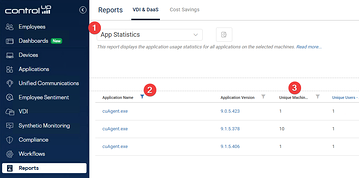
Yep, I’ve seen that, but it will not work. When you click on the version numbers, it doesn’t show all the servers running that version. Same thing happens if you click on the process name.
It’s perplexing that something like this doesn’t exist.
I want something like the screenshot below.
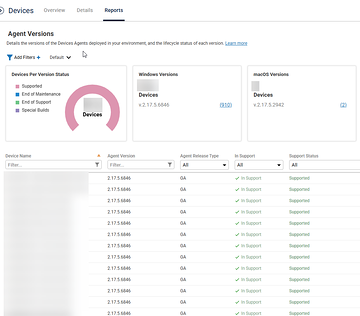
Okay, that’s odd…
When you use "App Usage Details" and group by machine?
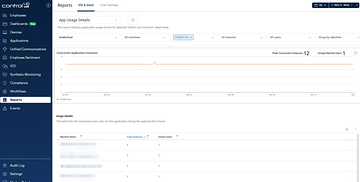
You will not see something the same in VDI like you see in CU4D by now…
So theres no flag you can use if cuAgent.exe is supported or not. Thats "just" availalable in CU4D if Iam not mistaken.
So with the report above you should see the Citrix Servers and the cuAgent Version number.
If the monitor-server(s) are able to contact them 🙂
Thank you for finding a way to do this since we couldn’t, but it still feels like such a finicky way to view the data. I’ll stick with my endpoint management tool and run reports for now. Thanks again.
I totally know what you mean 🙂
In ControlUp there are a lot of "ways to Rome" (not sure if this saying fits outside Germany) to be honest…
Continue reading and comment on the thread ‘How to Verify Correct Version of ControlUp Agent on Citrix Servers’. Not a member? Join Here!
Categories: All Archives, ControlUp for VDI