
A user shared an endpoint script (zzSP_Prod_IGEL_Thinclient_SmartStatus) that can be used in IGEL or thin-client environments to gather information about SSD and storage wear. The script shows important details such as wear level, TB written, and pre-EOL state and can be helpful in proactive hardware-lifecycle management. The dashboard and script are available for use.
Read the entire ‘Proactively Managing Thin-Client SSD Wear: A New Endpoint Script from ControlUp Community Members’ thread below:
Hi team,
sharing is caring, so here is something for anyone working IGEL or thin-client environments.
I built an Endpoint script that pulls SSD and storage wear from IGEL OS and Linux endpoints (zzSP_Prod_IGEL_Thinclient_SmartStatus). It handles the messy reality of thin-client storage:
• SATA, NVMe, and eMMC, with smartctl plus sysfs fallbacks.
• Validated against HP T640 configs (16/32/64 GB eMMC, 128 GB M.2 SATA, 256/512 GB NVMe).
• It sends to the ssd_health index and surfaces wear level, TB written, power-on hours, reallocated sectors, and pre-EOL state.
Why it helps in a deal: thin-client SSD wear is a blind spot for almost every customer. Being able to show "this device is at 95% wear and about to fail" is a proactive hardware-lifecycle story that lands well, especially in IGEL-heavy fleets.
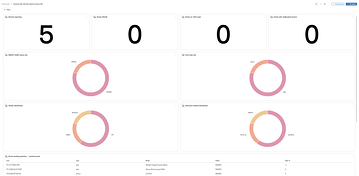
The matching dashboard is attached as export: Thinclient IGEL SSD Disk Health & Lifecycle (SP Public)
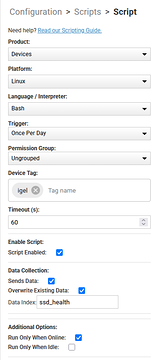
Script as well (Run it once a day with data Index: attached the settings as screenshot.
Drop me a message if you want a quick walkthrough!
Thank you @member for creating this Community and to everyone for keeping this alive!
P.S.: it might work with devices on Linux as well, still searching for devices to test 😄
Great stuff, Sebas!
Brilliant, as always !!
Continue reading and comment on the thread ‘Proactively Managing Thin-Client SSD Wear: A New Endpoint Script from ControlUp Community Members’. Not a member? Join Here!
Categories: All Archives, ControlUp Dashboards, ControlUp Scripts & Triggers