
Multiple ControlUp members discussed how to include IGEL endpoints in a report and dashboard. Different solutions were proposed, such as using a custom index and dashboard, or filtering the Device Inventory Dashboard by OS patch string. The issue is planned to be fixed in February, but temporary solutions are available. URL: https://support.controlup.com/hc/en-us/articles/360012939118-Device-inventory-dashboards
Read the entire ‘Tips for Including IGEL Endpoints in ControlUp Reports and Dashboards’ thread below:
Can i get some help on upvoting this one please? I don’t understand why the report doesn’t include IGEL endpoints as the data is there. thanks!

@member can you have a look
Is someone looking into this?
I think the report has a direct connection to our version management capability that is tied to our agent manager, so probably just a design choice we did on the initial release. We’ll see how we can best handle it. In the meantime I’m wondering if we can do something with a custom index and dashboard. Just need to check how we can integrate with EOS data. @member ?
(Linux had no agent manager because there are different implementations for different vendors)
I’ll put it on my todo let me check if I can make something in dashboards 🫡🫡 @member how would you like the report/dashboard to look? Just like the build in report ? We can do some more with dashboards ofcourse like bar charts etc 🙂 I’ll look into it next week!
Anything, whatever you think would be helpful! Thanks
The report is planned to be fixed for Linux and ChromeOS end of February. iGel devices are reported under the Linux platform.
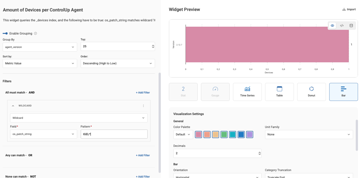
@member so there are a few options actually to get insights into your IGEL devices. So if you go to Dashboards then dashboard gallery. There you will find a Device Inventory Dashboard. You can use that to find which agent versions are installed. You can use the filters to filter on group or tag. So if you have an Igel group or tag its super easy to filter the whole dashboard to just igels. If you havent then you can copy customize the dashboard and on the widgets you want to have Igel only set a wildcard filter to os_patch_string and the IGEL* as value. Which should bring you to what you want ! Goodluck let me know if you need anything else
Continue reading and comment on the thread ‘Tips for Including IGEL Endpoints in ControlUp Reports and Dashboards’. Not a member? Join Here!
Categories: All Archives, ControlUp Dashboards, ControlUp for Desktops